

AINOTE News

Get access to our latest news by signing up for our newsletter.

AINOTE AI Model Upgrade: Introducing GPT-6 Luna & GPT-6.1 Sol

AINOTE AI Model Upgrade: Introducing GPT-6 Luna & GPT-6.1 Sol

We’re excited to announce the latest AI model upgrade for AINOTE 2 and AINOTE Air 2! With GPT-6 Luna now available as the default free model for Starter users and GPT-6.1 Sol available to Pro subscribers, AINOTE continues to expand the AI options available to help you work with your notes and information. Whether you're capturing ideas during a business meeting, reviewing key discussion points, or organizing information for your next project, the right AI tools can help you turn notes into something more useful. In this update, we’ll walk you through what’s new, how the updated model lineup fits different workflows, and what to know about accessing the available AI models on your AINOTE device. What's New in the AINOTE AI Model Update? The latest update introduces new default and premium AI model options for AINOTE 2 and AINOTE Air 2 users. AINOTE Starter: GPT-6 Luna The AINOTE Starter Plan has been upgraded from GPT-5.2 to GPT-6 Luna. GPT-6 Luna is now the default free AI model for Starter users, giving them access to the updated model for their everyday AI needs. For users who regularly capture meeting notes, organize information, or explore ideas with AI, this update offers a new model option within the Starter experience. AINOTE Pro: GPT-6.1 Sol For AINOTE Pro subscribers, the default model lineup has been upgraded from GPT-5.5 to GPT-6.1 Sol. Pro subscribers can also access Gemini 3.5 Flash and Gemini 3.7 Flash, providing additional model choices for different tasks. This expanded lineup gives Pro users more flexibility when choosing an AI model for their workflow, including tasks that involve reviewing information, exploring questions, and working through more complex topics. GPT-6 Luna in Action: Turn Scattered Ideas into a Clear Content Outline For AINOTE Starter users who want to capture ideas and organize their thinking on the go Great ideas don’t always arrive at your desk. You might be waiting to board a flight, sitting in an airport lounge, or traveling between meetings when an idea for next quarter’s content strategy suddenly takes shape. You open your AINOTE 2 and start writing. A few keywords lead to a headline, a rough paragraph sparks another thought, and arrows connect ideas that may not yet fit into a clear structure. By the time you’re finished, your notes capture the inspiration—but turning them into a usable outline is another task. With GPT-6 Luna ,the default free AI model for the AINOTE Starter Plan, you can use AIAide to help organize your handwritten notes into a more structured starting point. Rather than starting from a blank page, you have a draft structure to review, refine, and build on. You can adjust the outline, fill in missing details, and develop promising ideas into a more complete content plan when you have time. Whether you’re between flights or away from your desk, AINOTE 2 and GPT-6 Luna help you move from capturing an idea to organizing what comes next—all within your note-taking workflow. GPT-6.1 Sol in Action: Turn Complex Team Meetings into Clear Next Steps For AINOTE Pro users managing complex, cross-functional projects When 20 people from product, engineering, design, and operations come together for a weekly project review, the conversation rarely follows a straight line. Teams discuss technical changes, revisit UI decisions, align KPIs, and negotiate deadlines—all while raising new questions and dependencies along the way. For a project lead, capturing the conversation is only half the job. The real challenge is turning everything discussed into a clear plan that each team can act on. With AINOTE 2 or AINOTE Air 2, Pro users can select GPT-6.1 Sol in Meeting Summary to help organize meeting content into a more structured, reviewable summary. The summary can also help bring important follow-up details into view, such as a design specification due Wednesday or API documentation expected Friday—provided these commitments were captured in the meeting. Before sharing the results, review the summary against your original meeting content to confirm decisions, task owners, and deadlines. You can then use the organized notes as a starting point for team updates, project tracking, and the next weekly review. Spend less time reorganizing meeting notes and more time moving the project forward. With GPT-6.1 Sol available on the AINOTE Pro Plan, complex team discussions can become a clearer starting point for coordinated follow-up. Actual summary results depend on the meeting content. Review AI-generated notes before using them as a record of project decisions or commitments. AINOTE Starter vs. Pro: Which Plan Fits Your Workflow? The right plan depends on which model options you want available and how you use AI in your daily work. Choose AINOTE Starter if... You want to use GPT-6 Luna as your default free AI model. Your workflow centers on everyday AI assistance and working with notes. You want to explore the updated model experience before considering additional model options. Consider AINOTE Pro if... You want access to GPT-6.1 Sol. You want additional model choices, including Gemini 3.5 Flash and Gemini 3.7 Flash. Your workflow involves varied tasks and you want the flexibility to select among the available models. The model lineup alone does not determine which plan will be best for every user. Your choice should also reflect your usage needs, the features included in each plan, and the current subscription terms. Explore the full AINOTE experience and discover the devices and features designed to support your workflow on our official website. How to Access the Updated AI Models No manual system update or download is required.The new models are live and ready to use on your AINOTE device. To get started: Open an AI feature on your device, such as  AIAide or  Meeting Summary. Tap the AI model selector.  Choose a model available under your subscription plan. Starter users can access GPT-6 Luna as their default free model. Pro subscribers can choose from the available options, including GPT-6.1 Sol, Gemini 3.5 Flash, and Gemini 3.7 Flash. Try the updated models with a task you already perform regularly, then review the results to find the workflow that works best for you. Frequently Asked Questions 1. Which AI models are available on AINOTE 2 and AINOTE Air 2? Starter users have GPT-6 Luna as their default free AI model. Pro subscribers can access GPT-6.1 Sol, Gemini 3.5 Flash, and Gemini 3.7 Flash. Available options depend on your subscription plan. 2. Is GPT-6 Luna the default model for AINOTE Starter users? Yes. GPT-6 Luna is the default free AI model for Starter users on AINOTE 2 and AINOTE Air 2. You do not need to manually switch models to activate it. 3. Which models can AINOTE Pro subscribers access? Pro subscribers can access GPT-6.1 Sol alongside Gemini 3.5 Flash and Gemini 3.7 Flash. They can select from the models available under their plan. 4. Do I need to install a system update or download anything to access the new models? No manual system update or download is required. The models are live and ready to use through supported AI features on your device. 5. How do I switch AI models on my AINOTE device? Open an AI feature such as AIAide or Meeting Summary, tap the AI model selector, and choose a model available under your subscription plan. 6. What is the difference between GPT-6 Luna and GPT-6.1 Sol on AINOTE? GPT-6 Luna is the default free model for Starter users, while GPT-6.1 Sol is available to Pro subscribers alongside Gemini 3.5 Flash and Gemini 3.7 Flash. The plans provide different model options. For a task-specific comparison, you can test the available models using the same input and instructions and review the results against your needs. Join the AINOTE Community Have questions about the updated AI models, or found a workflow that works particularly well for you? Join the AINOTE community on Reddit to share your experience, ask questions, connect with other users, and let us know what you'd like to see next. Join the AINOTE Community on Reddit Your feedback helps us better understand how people use AINOTE and which improvements matter most. Explore AINOTE 2 and AINOTE Air 2 Whether you're organizing meeting notes, reviewing project information, or preparing for your next discussion, the updated AINOTE AI model lineup gives you more options to explore within your workflow. With GPT-6 Luna as the default free model for Starter users and GPT-6.1 Sol alongside Gemini 3.5 Flash and Gemini 3.7 Flash for Pro subscribers, you can choose from the models available under your plan and find an approach that fits the way you work. Ready to learn more? Explore AINOTE 2 Explore AINOTE Air 2 Visit the official AINOTE website Model availability described here is based on the AINOTE AI model upgrade announcement. Subscription terms and available options are subject to the plan and device you use. For the latest information, refer to official AINOTE announcements and documentation.

AINOTE at IFA 2026: Overview, Awards, and Off-Site Workshop

AINOTE at IFA 2026: Overview, Awards, and Off-Site Workshop

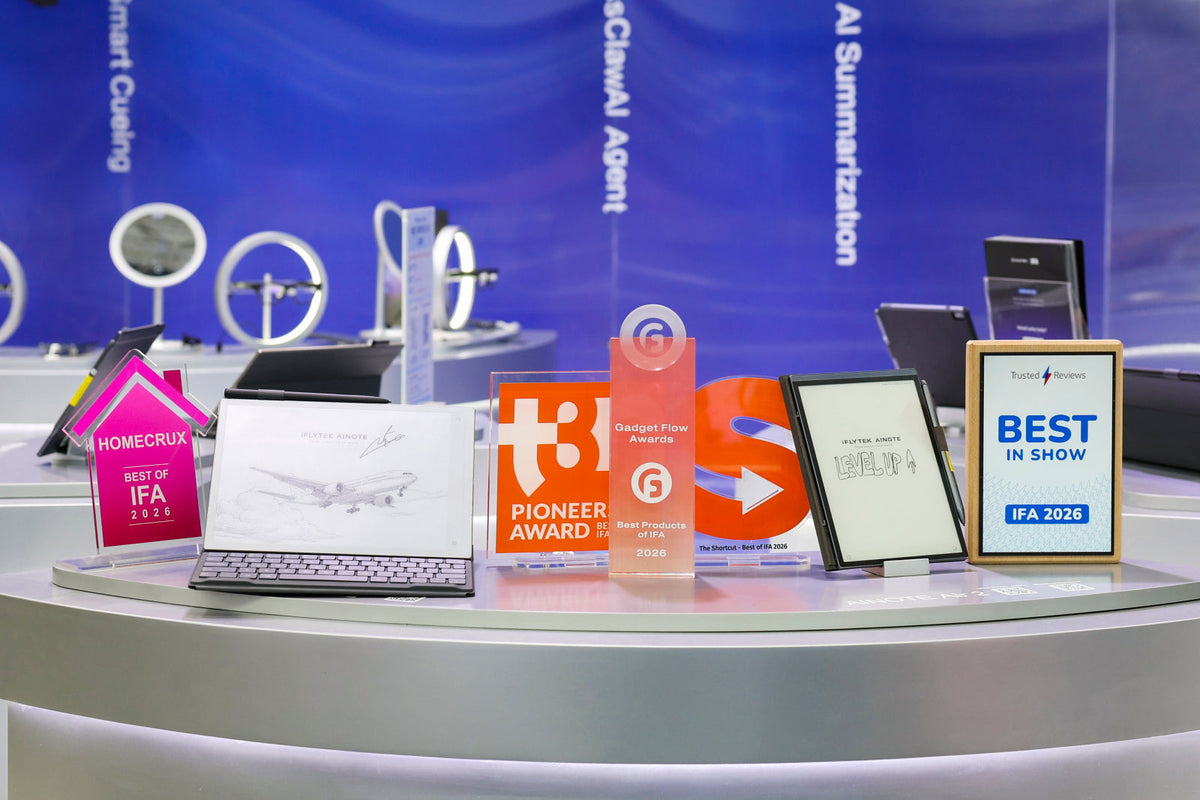
From September 4–8, 2026, AINOTE exhibited for the first time at IFA Berlin, located in Hall 4.2, Stand 115. The event provided an opportunity to present AINOTE 2 and AINOTE Air 2 to European and international audiences. Throughout the show, visitors engaged with the devices in person. Demonstrations focused on three core capabilities: paper-like handwriting on E Ink displays, voice-to-text transcription supporting 18 languages, and AINOTE Skill, which connects notes, calendars, and tasks to AI Agents such as Claude Code and Codex. These features collectively illustrate AINOTE’s positioning as a productivity tool that integrates handwriting, voice, and AI in a single workspace. The exhibition served as a platform to gather direct feedback and observe how professionals, students, and technology enthusiasts interact with the product in a live setting. This input will inform future software and feature development.   AINOTE Receives Four Awards at IFA 2026 During IFA 2026, AINOTE was recognized with four industry awards: t3n Pioneers Award — Best of IFA 2026 Trusted Reviews Best in Show — IFA 2026 The Shortcut Award Gadget Flow Award The t3n Pioneers Award recognizes innovation in consumer technology. t3n, a German technology publication, selected AINOTE for its approach to AI-powered productivity. Trusted Reviews Best in Show is awarded by the UK-based technology outlet Trusted Reviews, highlighting products that distinguish themselves in their category. The Shortcut Award acknowledges products that improve accessibility and intuitive use. AINOTE’s handwriting-first, distraction-free design was cited as a contributing factor. Gadget Flow Award recognizes products that combine design with practical utility. AINOTE’s form factor, E Ink display, and AI features were considered in the selection. These awards reflect external validation of AINOTE’s development direction. They also underscore the product’s focus on integrating handwriting, voice, and AI into a cohesive productivity tool.   Off-Site Workshop: AINOTE at WeWork Berlin Beyond the exhibition hall, AINOTE hosted an off-site workshop during IFA week. The event took place at WeWork Warschauer Platz in Berlin, a location situated near Warschauer Straße station and the East Side Gallery. This site is part of one of Berlin’s largest WeWork communities, with an estimated 6,500 to 8,000 corporate members across the city. The audience included professionals from technology, creative, and international business sectors. The workshop was structured to provide hands-on experience in a realistic office environment rather than a trade show booth. Activities included: 15-minute hands-on sessions where participants tested AINOTE 2 and AINOTE Air 2 within scenarios resembling their daily work routines. Cross-border meeting simulations demonstrating real-time transcription in 18 languages, speaker identification, and automated meeting summaries powered by large language models including GPT-5 and Gemini. Handwriting-to-AI workflow walkthroughs showing how handwritten notes are converted into structured action items and synced with calendars and tasks. In the evening, AINOTE hosted a creator reception and keynote session. Conan Guo, Chief Product Officer at iFLYTEK, shared the company’s vision for the European market: "We're not trying to make AI more complicated or futuristic. We're trying to make it genuinely useful in the things we already do every day." The off-site event generated direct feedback from professionals who regularly manage multilingual meetings, mobile work, and cross-border collaboration. This feedback is being collected and will contribute to product refinement for European users. In addition, attending content creators shared their experiences on social media, extending the reach of the workshop beyond Berlin. Among them was Wajihoo, a creator with a substantial following, who documented the event and AINOTE’s capabilities.   Looking Ahead IFA 2026 marked AINOTE’s first appearance at a major international trade show. The four awards, visitor engagement, and off-site workshop feedback provide a foundation for continued development. Under the philosophy "AI FOR USE, AI FOR TRUST," AINOTE remains committed to data governance and privacy, offering AWS Frankfurt cloud hosting, offline functionality, and compliance with GDPR, ISO 27001/27701, and EN 18031 certifications. Future plans include continued software updates for AINOTE and AI features, expanded retail availability in Europe, and ongoing community engagement through the official Reddit community. For those who could not attend IFA, product information and updates are available on the AINOTE website and blog.

Sep 9, 2026 AINOTEBRAND 0 comments
AINOTE Skill Deep Dive – Connect Notes & Schedule Directly to Claude Code & Codex

AINOTE Skill Deep Dive – Connect Notes & Schedule Directly to Claude Code & Codex

With AINOTE Skill, you can generate a secure authorization link to connect your cloud-backed notes, calendar schedules, tasks, and focus star directly into your favorite AI Agents—including Claude Code and Codex—as a dynamic context stream. Your AI Agent can now truly "understand" your knowledge base. Through simple natural language prompts, it can analyze across multiple notes, check for schedule conflicts, and even create new tasks or folders for you.

Aug 18, 2026 AINOTEBRAND 0 comments
AINOTE 2AINOTE 2 August 2026 Update: Full Feature Roundup – PDF in Notes, Floating Toolbar, AINOTE Skill & More

AINOTE 2 August 2026 Update: Full Feature Roundup – PDF in Notes, Floating Toolbar, AINOTE Skill & More

AINOTE 2 August 2026 Update Is Now Rolling Out We're excited to announce that the August 2026 firmware update for AINOTE 2 is officially rolling out to all devices. This release represents one of our most substantial updates to date, delivering a wide range of new features and improvements based directly on your feedback. From note-taking and calendar management to reading experience and AI ecosystem integration—here's everything you need to know about what's new on your AINOTE 2. 📌 Also New for AINOTE 2 Users: This update introduces AINOTE skill, a powerful new feature that connects your notes and calendar directly to AI Agents like Claude Code and Codex.  1. Note-Taking & Creation Toolbar Optimizations Continuous Pen Thickness: Smooth, continuous adjustments for pen thickness across Notes, PDFs, e-books, and Office documents on your AINOTE 2 Flexible Floating Toolbar: Collapses into a sleek floating widget (pen, text, recording) that can be moved freely along the screen edges Top/Bottom Tab Bar: Adjust the tab bar between the top and bottom of the screen for a customized layout PDF Direct Import Insert PDFs directly into your active note on AINOTE 2 unencrypted. Once inserted, you can use all native note editing and handwriting features on the PDF seamlessly. Page & Bookmark Management Multi-Select Pages: Cut, copy, paste, hide, or delete pages. Copy pages to the clipboard and paste them into other notes Categorized Bookmarks: View bookmarks sorted by Headings, Tasks, and Stars, with one-tap jumps to exact locations Audio, Transcription & AI Summaries Background Recording: Added a toggle to continue recording when the folio cover is closed (ON by default) Delete Audio Only: Delete audio files independently to save space, with the ability to insert the transcript into the note body first More AI Templates: Expanded templates for meetings, lectures, videos, personal memos, and more Broader Languages: Expanded translation language picker Sharing & Exporting Added TXT format for sharing and exporting from your AINOTE 2 Both MP3 and TXT now support complete offline export 2. Calendar & Tasks Custom Recurrence: Tailor recurring patterns for both schedules and tasks Smart Lockscreen Widget: Displays today's schedule by default. When today has no all-day events, all schedules have ended, and all tasks are done, it automatically switches to show tomorrow's schedule (and updates the header to "Tomorrow's Schedule") 3. Reading Experience on AINOTE 2 Non-PDF Display Modes: Switch between General, Custom (per-book), and Classic Literature modes Layout Templates: Customize typography for an individual book and save it as a reusable template 4. AINOTE Agent Skill AINOTE 2 as your Capture Hub: Your AINOTE 2 serves as your primary mobile input tool. Seamlessly bridge your notes, raw ideas, and documents with mainstream AI platforms and dev environments (such as Codex, Claude Code, and more) for deep processing Bring Your Own API Key: Plug in your personal LLM API keys (e.g., OpenAI) to build custom automated workflows tailored to your exact productivity needs 💡 Note: The AINOTE skill feature requires the AINOTE Desktop App to configure. The AINOTE 2 device captures and syncs your notes, while the desktop app handles the API integration. 5. System Tweaks & Handy Features on AINOTE 2 Screenshot Annotations: Draw directly on screenshots with customizable pens, thickness, and erasers. Supports canvas zooming, saving, and sharing AINOTE Assistant & Support: Access the AI Assistant on the home screen/settings for quick product Q&A, view estimated feedback processing times, or copy regional support emails with one tap Wallpapers: Added full-screen signature wallpapers and clean, logo-free cloud wallpapers for your AINOTE 2 Third-Party Apps: Supports landscape mode, bold text, custom display settings, and long-pressing to pin apps to the top Login Upgrade: Log in quickly using email verification codes Multilingual User Guide: Added a native Japanese user guide (default for Japanese systems) with easy switching between English and Japanese Top Physical Button Customization: Customize the physical top button on your AINOTE 2 for quick actions (Quick AI Q&A, Instant Screenshot, Global Refresh, Go Home, New Note, or Back) How to Update Your AINOTE 2 Auto-Update: When you open your AINOTE 2, the system will automatically detect the new firmware version and prompt you to update. Simply follow the on-screen instructions. Manual Check: You can also manually check for updates in Settings → System → Software Update on your AINOTE 2 device. What This Means for AINOTE 2 Users The August 2026 update marks a significant step forward for the AINOTE 2. From PDF direct import and floating toolbar to AINOTE agent skill support and offline TXT export, we're delivering on our promise to build a unified productivity system where your notes, calendar, and AI tools work together seamlessly on your AINOTE 2. And this is just the beginning. The features in this update lay the groundwork for even more powerful capabilities coming in future releases. Have you received the August update on your AINOTE 2 yet? Join the conversation in our Official Reddit Community and share your experience in the comments.

Aug 18, 2026 AINOTEBRAND 0 comments
AINOTE Air2A Major Update for the AINOTE Air 2, and an Even Bigger Thank You

A Major Update for the AINOTE Air 2, and an Even Bigger Thank You

The AINOTE Air 2 recently received its biggest software overhaul yet—the NoteOS update, bringing a redesigned interface, upgraded Fusion Notes,  enhanced handwriting tools, and improved AI transcription capabilities. For a complete walkthrough of everything new in this release, check out our detailed announcement: AINOTE Air 2 Major System Update – NoteOS. But the real news today is about something else: a special thank-you to our earliest users. 5 Years of Pro – Free for Early AINOTE Air 2 Users To show our appreciation for the users who believed in the AINOTE Air 2 from the beginning, we're offering an exclusive reward: All AINOTE Air 2 users who activated their devices on or before October 31, 2026, are eligible to receive 5 years of AINOTE Pro Plan – at no cost. This is our way of saying thank you for your trust and support. We call it the "Loyal User Exclusive Benefit" – because that's exactly what it is. What Does AINOTE Pro Unlock? Pro Plan takes your AINOTE Air 2 to the next level. Here's what you get: More AI Models to Choose From – In addition to GPT-5.2, Pro gives you access to GPT-5.5,Gemini 3.5 Flash and future models Unlimited Note Sync – Back up all your work and access it across devices – no storage limits, no time restrictions Pro is built for users who want to take productivity further – and now, early AINOTE Air 2 users can enjoy it for 5 full years, completely free. Note: The 5-year gift Pro Plan does not include AINOTE Care+'s replacement service. Reward Period Validity – 5 years from the successful claim date (5 × 365 days) Claim Deadline – December 31, 2026, 23:59:59*To claim the benefit, activate your existing or new device by October 31, and follow the on-screen instructions before December 31. If not claimed, the benefit will automatically expire on December 31. Important Things to Know 1. Your Benefit is Tied to Your Account, Not a Single DeviceOnce claimed, the 5-year Pro Plan is permanently linked to your AINOTE account – not to a specific device. Log in to any AINOTE device and enjoy your Pro benefits wherever you go. The Pro Plan cannot be sold, transferred, or redeemed for cash. 2. One Benefit per Eligible DeviceTo ensure fairness, each eligible AINOTE Air 2 device can generate only one 5-year Pro Plan. The system will accurately identify each device – duplicate requests will not be processed. 3. One Benefit per AccountEach AINOTE account can claim this reward only once. If you own multiple eligible AINOTE Air 2 devices, simply choose one of them to claim your gift. Your other devices will not generate additional rewards for the same account. 4. Your Free Pro Plan Will Be Added to Your Existing PlanIf your account already has an active Pro Plan, the 5-year gift will be automatically extended – giving you even more time to enjoy the benefits without interruption. For example: Current Pro Plan valid until June 30, 2027 After claiming the 5-year gift, the new expiration date extends to June 28, 2032(after 365 × 5 days) 5. The 5-Year Gift is a Non-Annual Pro Plan – Care+ Replacement Not IncludedThis complimentary 5-year Pro Plan is a non-annual Pro plan. It does not include the one-time replacement-for-repair service under AINOTE Care+. For full details on what is and isn't included, please refer to our AINOTE Pro subscription page. A Quick Reminder: If you currently have auto-renewal enabled, please review your subscription settings after claiming to avoid any charges during your free Pro Plan period. How to Claim Your 5-Year Pro Gift Ensure your AINOTE Air 2 was activated on or before October 31, 2026 Open your AINOTE device and navigate to the rewards or Pro Plan section Follow the on-screen instructions to claim your 5-year Pro Plan Confirm the claim and enjoy your extended Pro benefits If you encounter any issues, please reach out to our customer support team for assistance. Why This Matters The NoteOS update made the AINOTE Air 2 more powerful than ever. And now, with 5 years of Pro Plan included for early users, your device is ready to handle your workflow from transcription to premium cloud sync – all without recurring fees. If you're an eligible AINOTE Air 2 user, don't wait. Claim your 5-year Pro Plan before the December 31 deadline and unlock the full potential of your device. New to AINOTE Air 2? This Is Your Moment. If you're not yet an AINOTE Air 2 owner, this is the time to act. Any device purchased and activated on or before October 31, 2026, qualifies for the same 5-year Pro Plan gift. Whether you're upgrading from another note-taking device or taking your first step into the world of AI-powered E Ink AI notebook, this offer makes the AINOTE Air 2 an even more compelling choice. Don't miss out – grab yours before October 31 and lock in 5 years of Pro, free. Have you received the NoteOS update on your AINOTE Air 2? Join the official Reddit community to share your experience with other users.

Aug 4, 2026 AINOTEBRAND 0 comments
AINOTE Air2AINOTE Air 2 Major System Update: NoteOS Officially Rolls Out

AINOTE Air 2 Major System Update: NoteOS Officially Rolls Out

The wait is finally over for AINOTE Air 2 users. AINOTE has officially begun rolling out a significant system update that brings the brand-new NoteOS experience to the device. This is not a routine patch or a minor feature tweak. According to the official announcement, this is a major system upgrade that fundamentally changes the user interface and how key features operate on the Air 2. The update is being pushed in small, staged batches to ensure system stability, so if you haven't received the notification on your device yet, don't worry—more users will be added over the coming days. Here's a comprehensive breakdown of what the NoteOS update brings to your AINOTE Air 2.   What's New in the NoteOS Update 1. A Completely Redesigned System Interface The most visible change is the overhauled user interface. The update touches virtually every corner of the system: Home, Notes, Reading, Calendar, App Center, Settings, and Control Center have all been redesigned from the ground up Navigation has been restructured - major entry points are now organized differently, so some features may be located in new places Visual elements including text, icons, cards, and information hierarchy have been optimized specifically for the Air 2's E Ink display Multi-language layouts have been improved, with better font rendering, text wrapping, and button sizing across all supported system languages The goal is a more intuitive, visually cohesive experience that takes full advantage of the E Ink screen's capabilities. 2. Upgraded Fusion Notes & Handwriting For users who rely on the Air 2 for note-taking, this update delivers substantial improvements to the core writing experience: Unified Workspace The new Fusion Notes workspace brings together handwriting, audio, transcription, translation, and AI content into one seamless environment. Whether you're recording a meeting, writing notes by hand, or reviewing transcribed text, everything lives in a single, unified space. Enhanced Canvas Operations Reduced side-toolbar obstruction for a cleaner writing area Improved zooming, two-finger dragging, page turning, and scrolling Enhanced title editing and recording dialogs Handwriting Editing For the first time, users can now cut, copy, and paste handwriting across different pages and Fusion Notes. This brings handwriting editing much closer to the flexibility of text editing. Smart Pen Optimizations The update improves smart-pen selection, erase detection, and toolbar positioning, with better support for both left-handed and right-handed modes.   3. Recording, Transcription & Translation Upgrades The Air 2's AI-powered recording and transcription capabilities—one of its standout features—receive significant attention in this update: Improved Recording States Better visual feedback for recording start, in-progress, completion, and playback states. Flexible Transcript & Translation Views Users can now choose to view original text, translated text, or a side-by-side comparison - making it easier than ever to follow multi-language meetings and conversations. Seamless Audio Switching Play recordings through the built-in speaker, Type-C headphones, or Bluetooth headphones with smoother continuity. Enhanced Navigation Translation language selection, translation modes, and long-text navigation have all been reorganized for easier access.   What This Means for AINOTE Air 2 Users This update represents a significant step forward for the AINOTE Air 2. The NoteOS experience isn't just a cosmetic refresh—it's a fundamental rethinking of how the device handles note-taking, recording, and AI-powered productivity. For professionals who rely on the Air 2 for meeting transcription and daily note-taking, the improved Fusion Notes workspace and unified workflow will save time and reduce friction. For students and researchers, the enhanced handwriting tools and flexible translation views open up new possibilities for managing complex information. The hardware remains the same—an 8.2-inch E Ink display with a quad-core processor, 4GB RAM, and 32GB storage—but the software now delivers a much more polished and capable experience. How to Get the Update The NoteOS update is being rolled out in staged batches to ensure system stability: Check your device periodically for the update notification Connect to Wi-Fi before downloading—the update requires a stable internet connection Read the release notes carefully before installing—this is a major update that changes how some features work Back up your important notes before proceeding If you haven't received the update yet, rest assured that AINOTE is expanding the push to more users over the next few days.   Frequently Asked Questions 1. Does AINOTE Air 2 require an internet connection for AI features? Yes. AI features, including AI Meeting Minutes, Note Q&A, and online transcription, require an active internet connection. AI features also require account sign-in. 2. Can AINOTE Air 2 transcribe recordings offline? No. AINOTE Air 2 uses online cloud services for audio transcription, so an internet connection is required. 3. Will my notes remain available if I turn off cloud sync? Yes. Turning off cloud sync does not prevent you from accessing or using your locally stored notes. 4. What is Fusion Notes? Fusion Notes brings handwriting, audio recordings, transcription, translation, and AI-generated content together in one workspace, making it easier to manage and review your notes. 5. Can I convert scanned documents into editable notes? Yes. AINOTE Air 2 supports OCR, allowing you to recognize text in scanned documents and convert it into editable notes or PDFs. 6. Can I export my notes and AI-generated content? Yes. You can select different content, including original text, meeting minutes, AI results, and OCR-cleaned content, and generate PDF or TXT files. 7. Which languages does AINOTE Air 2 support? AINOTE Air 2 supports 14 system languages, including English, French, German, Spanish, Japanese, Korean, and more. 8. Can I use Bluetooth headphones to listen to recordings? Yes. You can play recordings through the built-in speaker, Type-C headphones, or Bluetooth headphones. 9. Is the Note OS update available for all AINOTE devices? The major Note OS Beta update described in this announcement was specifically rolled out for AINOTE Air 2. Update availability for other models should be checked separately. 10. What should I do if I encounter a problem after a system update? You can contact AINOTE Customer Support through the official support channels and provide details about the issue, including the affected feature and the steps that caused it.   Share Your Feedback AINOTE is actively seeking user feedback on this major update. You can share your thoughts and report any issues through the r/AINOTE community on Reddit User testing and real-world feedback are crucial to making this update rock-solid, so your input matters.   Final Thoughts The NoteOS update marks a new chapter for the AINOTE Air 2. With a redesigned interface, unified Fusion Notes workspace, enhanced handwriting tools, and improved transcription capabilities, the device is now more capable than ever as an AI-powered productivity tool. If you're an AINOTE Air 2 user, this is an update worth installing. Just make sure to read the release notes, back up your data, and give yourself some time to get familiar with the new interface and navigation. Have you received the NoteOS update on your AINOTE Air 2? Join the official Reddit community to share your experience with other users. https://www.reddit.com/r/iFLYTEKAINOTE/

Jul 30, 2026 AINOTEBRAND 0 comments