Latest News

Read All Articles
AINOTE AI Model Upgrade: Introducing GPT-6 Luna & GPT-6.1 Sol

AINOTE AI Model Upgrade: Introducing GPT-6 Luna & GPT-6.1 Sol

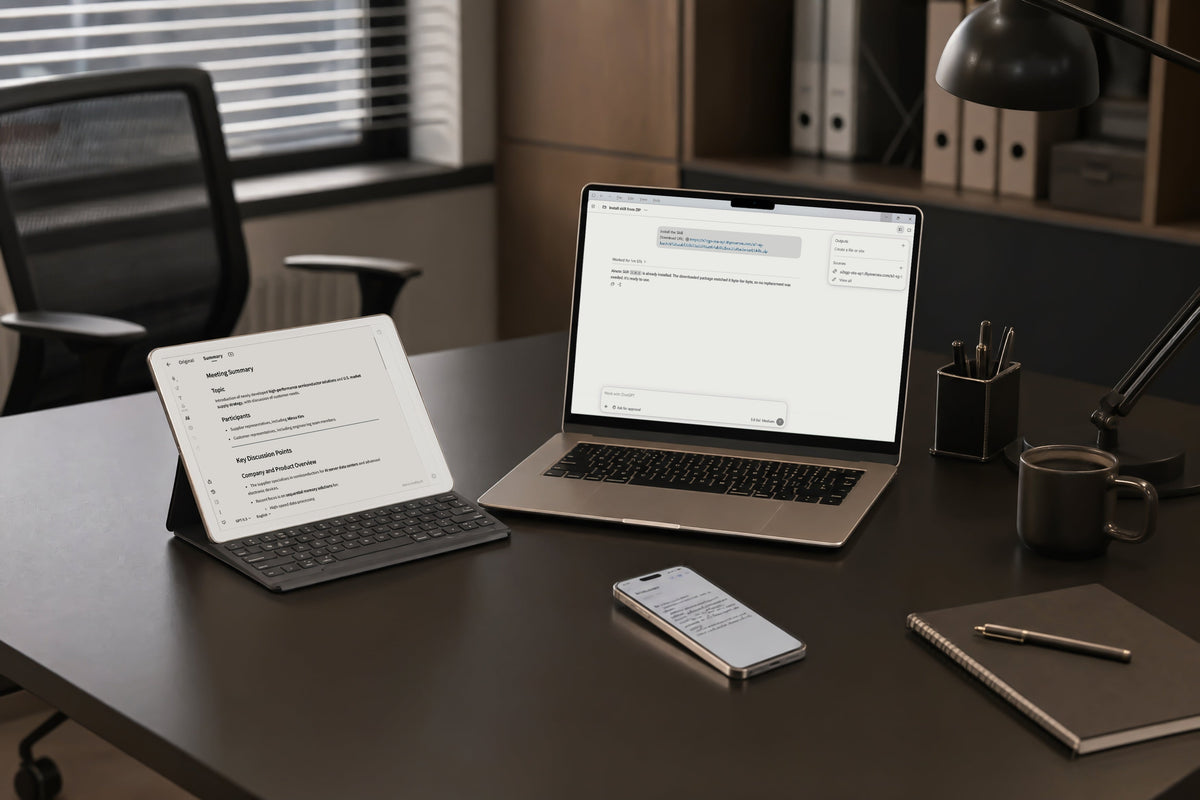
We’re excited to announce the latest AI model upgrade for AINOTE 2 and AINOTE Air 2! With GPT-6 Luna now available as the default free model for Starter users and GPT-6.1 Sol available to Pro subscribers, AINOTE continues to expand the AI options available to help you work with your notes and information. Whether you're capturing ideas during a business meeting, reviewing key discussion points, or organizing information for your next project, the right AI tools can help you turn notes into something more useful. In this update, we’ll walk you through what’s new, how the updated model lineup fits different workflows, and what to know about accessing the available AI models on your AINOTE device. What's New in the AINOTE AI Model Update? The latest update introduces new default and premium AI model options for AINOTE 2 and AINOTE Air 2 users. AINOTE Starter: GPT-6 Luna The AINOTE Starter Plan has been upgraded from GPT-5.2 to GPT-6 Luna. GPT-6 Luna is now the default free AI model for Starter users, giving them access to the updated model for their everyday AI needs. For users who regularly capture meeting notes, organize information, or explore ideas with AI, this update offers a new model option within the Starter experience. AINOTE Pro: GPT-6.1 Sol For AINOTE Pro subscribers, the default model lineup has been upgraded from GPT-5.5 to GPT-6.1 Sol. Pro subscribers can also access Gemini 3.5 Flash and Gemini 3.7 Flash, providing additional model choices for different tasks. This expanded lineup gives Pro users more flexibility when choosing an AI model for their workflow, including tasks that involve reviewing information, exploring questions, and working through more complex topics. GPT-6 Luna in Action: Turn Scattered Ideas into a Clear Content Outline For AINOTE Starter users who want to capture ideas and organize their thinking on the go Great ideas don’t always arrive at your desk. You might be waiting to board a flight, sitting in an airport lounge, or traveling between meetings when an idea for next quarter’s content strategy suddenly takes shape. You open your AINOTE 2 and start writing. A few keywords lead to a headline, a rough paragraph sparks another thought, and arrows connect ideas that may not yet fit into a clear structure. By the time you’re finished, your notes capture the inspiration—but turning them into a usable outline is another task. With GPT-6 Luna ,the default free AI model for the AINOTE Starter Plan, you can use AIAide to help organize your handwritten notes into a more structured starting point. Rather than starting from a blank page, you have a draft structure to review, refine, and build on. You can adjust the outline, fill in missing details, and develop promising ideas into a more complete content plan when you have time. Whether you’re between flights or away from your desk, AINOTE 2 and GPT-6 Luna help you move from capturing an idea to organizing what comes next—all within your note-taking workflow. GPT-6.1 Sol in Action: Turn Complex Team Meetings into Clear Next Steps For AINOTE Pro users managing complex, cross-functional projects When 20 people from product, engineering, design, and operations come together for a weekly project review, the conversation rarely follows a straight line. Teams discuss technical changes, revisit UI decisions, align KPIs, and negotiate deadlines—all while raising new questions and dependencies along the way. For a project lead, capturing the conversation is only half the job. The real challenge is turning everything discussed into a clear plan that each team can act on. With AINOTE 2 or AINOTE Air 2, Pro users can select GPT-6.1 Sol in Meeting Summary to help organize meeting content into a more structured, reviewable summary. The summary can also help bring important follow-up details into view, such as a design specification due Wednesday or API documentation expected Friday—provided these commitments were captured in the meeting. Before sharing the results, review the summary against your original meeting content to confirm decisions, task owners, and deadlines. You can then use the organized notes as a starting point for team updates, project tracking, and the next weekly review. Spend less time reorganizing meeting notes and more time moving the project forward. With GPT-6.1 Sol available on the AINOTE Pro Plan, complex team discussions can become a clearer starting point for coordinated follow-up. Actual summary results depend on the meeting content. Review AI-generated notes before using them as a record of project decisions or commitments. AINOTE Starter vs. Pro: Which Plan Fits Your Workflow? The right plan depends on which model options you want available and how you use AI in your daily work. Choose AINOTE Starter if... You want to use GPT-6 Luna as your default free AI model. Your workflow centers on everyday AI assistance and working with notes. You want to explore the updated model experience before considering additional model options. Consider AINOTE Pro if... You want access to GPT-6.1 Sol. You want additional model choices, including Gemini 3.5 Flash and Gemini 3.7 Flash. Your workflow involves varied tasks and you want the flexibility to select among the available models. The model lineup alone does not determine which plan will be best for every user. Your choice should also reflect your usage needs, the features included in each plan, and the current subscription terms. Explore the full AINOTE experience and discover the devices and features designed to support your workflow on our official website. How to Access the Updated AI Models No manual system update or download is required.The new models are live and ready to use on your AINOTE device. To get started: Open an AI feature on your device, such as  AIAide or  Meeting Summary. Tap the AI model selector.  Choose a model available under your subscription plan. Starter users can access GPT-6 Luna as their default free model. Pro subscribers can choose from the available options, including GPT-6.1 Sol, Gemini 3.5 Flash, and Gemini 3.7 Flash. Try the updated models with a task you already perform regularly, then review the results to find the workflow that works best for you. Frequently Asked Questions 1. Which AI models are available on AINOTE 2 and AINOTE Air 2? Starter users have GPT-6 Luna as their default free AI model. Pro subscribers can access GPT-6.1 Sol, Gemini 3.5 Flash, and Gemini 3.7 Flash. Available options depend on your subscription plan. 2. Is GPT-6 Luna the default model for AINOTE Starter users? Yes. GPT-6 Luna is the default free AI model for Starter users on AINOTE 2 and AINOTE Air 2. You do not need to manually switch models to activate it. 3. Which models can AINOTE Pro subscribers access? Pro subscribers can access GPT-6.1 Sol alongside Gemini 3.5 Flash and Gemini 3.7 Flash. They can select from the models available under their plan. 4. Do I need to install a system update or download anything to access the new models? No manual system update or download is required. The models are live and ready to use through supported AI features on your device. 5. How do I switch AI models on my AINOTE device? Open an AI feature such as AIAide or Meeting Summary, tap the AI model selector, and choose a model available under your subscription plan. 6. What is the difference between GPT-6 Luna and GPT-6.1 Sol on AINOTE? GPT-6 Luna is the default free model for Starter users, while GPT-6.1 Sol is available to Pro subscribers alongside Gemini 3.5 Flash and Gemini 3.7 Flash. The plans provide different model options. For a task-specific comparison, you can test the available models using the same input and instructions and review the results against your needs. Join the AINOTE Community Have questions about the updated AI models, or found a workflow that works particularly well for you? Join the AINOTE community on Reddit to share your experience, ask questions, connect with other users, and let us know what you'd like to see next. Join the AINOTE Community on Reddit Your feedback helps us better understand how people use AINOTE and which improvements matter most. Explore AINOTE 2 and AINOTE Air 2 Whether you're organizing meeting notes, reviewing project information, or preparing for your next discussion, the updated AINOTE AI model lineup gives you more options to explore within your workflow. With GPT-6 Luna as the default free model for Starter users and GPT-6.1 Sol alongside Gemini 3.5 Flash and Gemini 3.7 Flash for Pro subscribers, you can choose from the models available under your plan and find an approach that fits the way you work. Ready to learn more? Explore AINOTE 2 Explore AINOTE Air 2 Visit the official AINOTE website Model availability described here is based on the AINOTE AI model upgrade announcement. Subscription terms and available options are subject to the plan and device you use. For the latest information, refer to official AINOTE announcements and documentation.

Oct 27, 2026
AINOTE at IFA 2026: Overview, Awards, and Off-Site Workshop

AINOTE at IFA 2026: Overview, Awards, and Off-Site Workshop

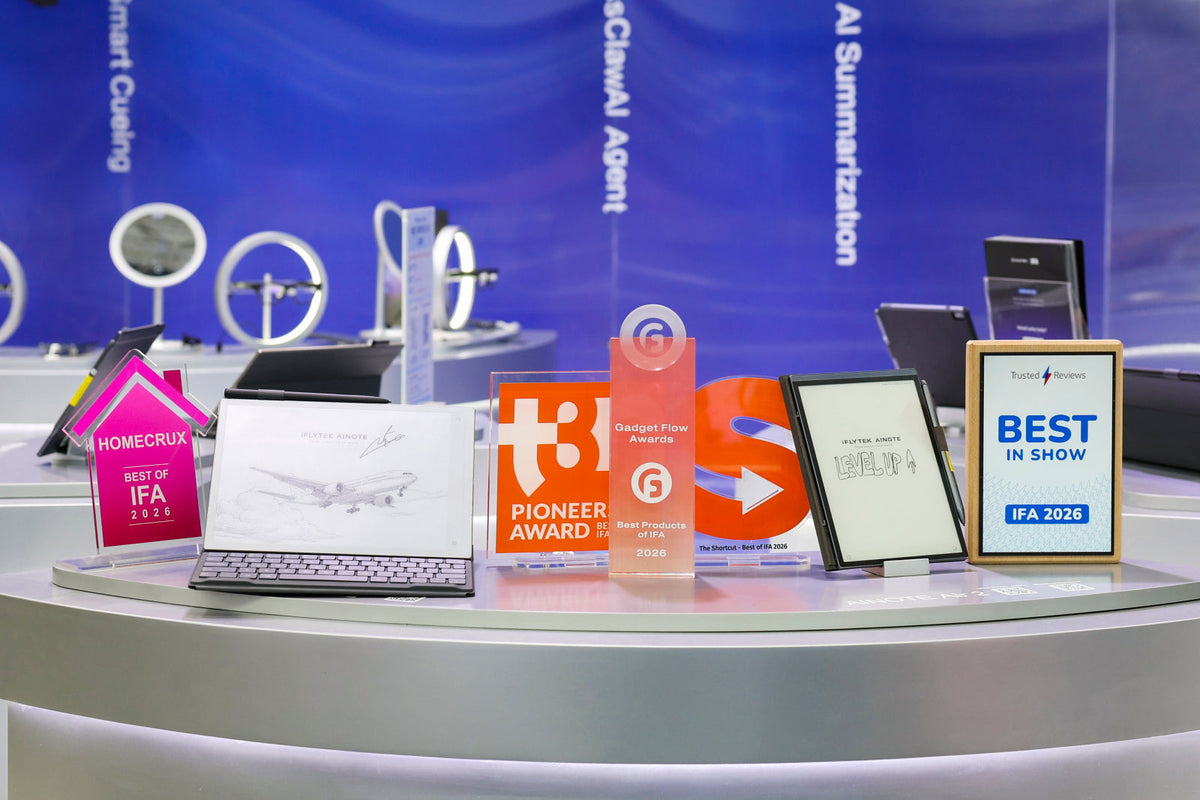
From September 4–8, 2026, AINOTE exhibited for the first time at IFA Berlin, located in Hall 4.2, Stand 115. The event provided an opportunity to present AINOTE 2 and AINOTE Air 2 to European and international audiences. Throughout the show, visitors engaged with the devices in person. Demonstrations focused on three core capabilities: paper-like handwriting on E Ink displays, voice-to-text transcription supporting 18 languages, and AINOTE Skill, which connects notes, calendars, and tasks to AI Agents such as Claude Code and Codex. These features collectively illustrate AINOTE’s positioning as a productivity tool that integrates handwriting, voice, and AI in a single workspace. The exhibition served as a platform to gather direct feedback and observe how professionals, students, and technology enthusiasts interact with the product in a live setting. This input will inform future software and feature development.   AINOTE Receives Four Awards at IFA 2026 During IFA 2026, AINOTE was recognized with four industry awards: t3n Pioneers Award — Best of IFA 2026 Trusted Reviews Best in Show — IFA 2026 The Shortcut Award Gadget Flow Award The t3n Pioneers Award recognizes innovation in consumer technology. t3n, a German technology publication, selected AINOTE for its approach to AI-powered productivity. Trusted Reviews Best in Show is awarded by the UK-based technology outlet Trusted Reviews, highlighting products that distinguish themselves in their category. The Shortcut Award acknowledges products that improve accessibility and intuitive use. AINOTE’s handwriting-first, distraction-free design was cited as a contributing factor. Gadget Flow Award recognizes products that combine design with practical utility. AINOTE’s form factor, E Ink display, and AI features were considered in the selection. These awards reflect external validation of AINOTE’s development direction. They also underscore the product’s focus on integrating handwriting, voice, and AI into a cohesive productivity tool.   Off-Site Workshop: AINOTE at WeWork Berlin Beyond the exhibition hall, AINOTE hosted an off-site workshop during IFA week. The event took place at WeWork Warschauer Platz in Berlin, a location situated near Warschauer Straße station and the East Side Gallery. This site is part of one of Berlin’s largest WeWork communities, with an estimated 6,500 to 8,000 corporate members across the city. The audience included professionals from technology, creative, and international business sectors. The workshop was structured to provide hands-on experience in a realistic office environment rather than a trade show booth. Activities included: 15-minute hands-on sessions where participants tested AINOTE 2 and AINOTE Air 2 within scenarios resembling their daily work routines. Cross-border meeting simulations demonstrating real-time transcription in 18 languages, speaker identification, and automated meeting summaries powered by large language models including GPT-5 and Gemini. Handwriting-to-AI workflow walkthroughs showing how handwritten notes are converted into structured action items and synced with calendars and tasks. In the evening, AINOTE hosted a creator reception and keynote session. Conan Guo, Chief Product Officer at iFLYTEK, shared the company’s vision for the European market: "We're not trying to make AI more complicated or futuristic. We're trying to make it genuinely useful in the things we already do every day." The off-site event generated direct feedback from professionals who regularly manage multilingual meetings, mobile work, and cross-border collaboration. This feedback is being collected and will contribute to product refinement for European users. In addition, attending content creators shared their experiences on social media, extending the reach of the workshop beyond Berlin. Among them was Wajihoo, a creator with a substantial following, who documented the event and AINOTE’s capabilities.   Looking Ahead IFA 2026 marked AINOTE’s first appearance at a major international trade show. The four awards, visitor engagement, and off-site workshop feedback provide a foundation for continued development. Under the philosophy "AI FOR USE, AI FOR TRUST," AINOTE remains committed to data governance and privacy, offering AWS Frankfurt cloud hosting, offline functionality, and compliance with GDPR, ISO 27001/27701, and EN 18031 certifications. Future plans include continued software updates for AINOTE and AI features, expanded retail availability in Europe, and ongoing community engagement through the official Reddit community. For those who could not attend IFA, product information and updates are available on the AINOTE website and blog.

Sep 9, 2026
AINOTE Skill Deep Dive – Connect Notes & Schedule Directly to Claude Code & Codex

AINOTE Skill Deep Dive – Connect Notes & Schedule Directly to Claude Code & Codex

With AINOTE Skill, you can generate a secure authorization link to connect your cloud-backed notes, calendar schedules, tasks, and focus star directly into your favorite AI Agents—including Claude Code and Codex—as a dynamic context stream. Your AI Agent can now truly "understand" your knowledge base. Through simple natural language prompts, it can analyze across multiple notes, check for schedule conflicts, and even create new tasks or folders for you.

Aug 18, 2026
AINOTE 2AINOTE 2 August 2026 Update: Full Feature Roundup – PDF in Notes, Floating Toolbar, AINOTE Skill & More

AINOTE 2 August 2026 Update: Full Feature Roundup – PDF in Notes, Floating Toolbar, AINOTE Skill & More

AINOTE 2 August 2026 Update Is Now Rolling Out We're excited to announce that the August 2026 firmware update for AINOTE 2 is officially rolling out to all devices. This release represents one of our most substantial updates to date, delivering a wide range of new features and improvements based directly on your feedback. From note-taking and calendar management to reading experience and AI ecosystem integration—here's everything you need to know about what's new on your AINOTE 2. 📌 Also New for AINOTE 2 Users: This update introduces AINOTE skill, a powerful new feature that connects your notes and calendar directly to AI Agents like Claude Code and Codex.  1. Note-Taking & Creation Toolbar Optimizations Continuous Pen Thickness: Smooth, continuous adjustments for pen thickness across Notes, PDFs, e-books, and Office documents on your AINOTE 2 Flexible Floating Toolbar: Collapses into a sleek floating widget (pen, text, recording) that can be moved freely along the screen edges Top/Bottom Tab Bar: Adjust the tab bar between the top and bottom of the screen for a customized layout PDF Direct Import Insert PDFs directly into your active note on AINOTE 2 unencrypted. Once inserted, you can use all native note editing and handwriting features on the PDF seamlessly. Page & Bookmark Management Multi-Select Pages: Cut, copy, paste, hide, or delete pages. Copy pages to the clipboard and paste them into other notes Categorized Bookmarks: View bookmarks sorted by Headings, Tasks, and Stars, with one-tap jumps to exact locations Audio, Transcription & AI Summaries Background Recording: Added a toggle to continue recording when the folio cover is closed (ON by default) Delete Audio Only: Delete audio files independently to save space, with the ability to insert the transcript into the note body first More AI Templates: Expanded templates for meetings, lectures, videos, personal memos, and more Broader Languages: Expanded translation language picker Sharing & Exporting Added TXT format for sharing and exporting from your AINOTE 2 Both MP3 and TXT now support complete offline export 2. Calendar & Tasks Custom Recurrence: Tailor recurring patterns for both schedules and tasks Smart Lockscreen Widget: Displays today's schedule by default. When today has no all-day events, all schedules have ended, and all tasks are done, it automatically switches to show tomorrow's schedule (and updates the header to "Tomorrow's Schedule") 3. Reading Experience on AINOTE 2 Non-PDF Display Modes: Switch between General, Custom (per-book), and Classic Literature modes Layout Templates: Customize typography for an individual book and save it as a reusable template 4. AINOTE Agent Skill AINOTE 2 as your Capture Hub: Your AINOTE 2 serves as your primary mobile input tool. Seamlessly bridge your notes, raw ideas, and documents with mainstream AI platforms and dev environments (such as Codex, Claude Code, and more) for deep processing Bring Your Own API Key: Plug in your personal LLM API keys (e.g., OpenAI) to build custom automated workflows tailored to your exact productivity needs 💡 Note: The AINOTE skill feature requires the AINOTE Desktop App to configure. The AINOTE 2 device captures and syncs your notes, while the desktop app handles the API integration. 5. System Tweaks & Handy Features on AINOTE 2 Screenshot Annotations: Draw directly on screenshots with customizable pens, thickness, and erasers. Supports canvas zooming, saving, and sharing AINOTE Assistant & Support: Access the AI Assistant on the home screen/settings for quick product Q&A, view estimated feedback processing times, or copy regional support emails with one tap Wallpapers: Added full-screen signature wallpapers and clean, logo-free cloud wallpapers for your AINOTE 2 Third-Party Apps: Supports landscape mode, bold text, custom display settings, and long-pressing to pin apps to the top Login Upgrade: Log in quickly using email verification codes Multilingual User Guide: Added a native Japanese user guide (default for Japanese systems) with easy switching between English and Japanese Top Physical Button Customization: Customize the physical top button on your AINOTE 2 for quick actions (Quick AI Q&A, Instant Screenshot, Global Refresh, Go Home, New Note, or Back) How to Update Your AINOTE 2 Auto-Update: When you open your AINOTE 2, the system will automatically detect the new firmware version and prompt you to update. Simply follow the on-screen instructions. Manual Check: You can also manually check for updates in Settings → System → Software Update on your AINOTE 2 device. What This Means for AINOTE 2 Users The August 2026 update marks a significant step forward for the AINOTE 2. From PDF direct import and floating toolbar to AINOTE agent skill support and offline TXT export, we're delivering on our promise to build a unified productivity system where your notes, calendar, and AI tools work together seamlessly on your AINOTE 2. And this is just the beginning. The features in this update lay the groundwork for even more powerful capabilities coming in future releases. Have you received the August update on your AINOTE 2 yet? Join the conversation in our Official Reddit Community and share your experience in the comments.

Aug 18, 2026
AINOTE Air2A Major Update for the AINOTE Air 2, and an Even Bigger Thank You

A Major Update for the AINOTE Air 2, and an Even Bigger Thank You

The AINOTE Air 2 recently received its biggest software overhaul yet—the NoteOS update, bringing a redesigned interface, upgraded Fusion Notes,  enhanced handwriting tools, and improved AI transcription capabilities. For a complete walkthrough of everything new in this release, check out our detailed announcement: AINOTE Air 2 Major System Update – NoteOS. But the real news today is about something else: a special thank-you to our earliest users. 5 Years of Pro – Free for Early AINOTE Air 2 Users To show our appreciation for the users who believed in the AINOTE Air 2 from the beginning, we're offering an exclusive reward: All AINOTE Air 2 users who activated their devices on or before October 31, 2026, are eligible to receive 5 years of AINOTE Pro Plan – at no cost. This is our way of saying thank you for your trust and support. We call it the "Loyal User Exclusive Benefit" – because that's exactly what it is. What Does AINOTE Pro Unlock? Pro Plan takes your AINOTE Air 2 to the next level. Here's what you get: More AI Models to Choose From – In addition to GPT-5.2, Pro gives you access to GPT-5.5,Gemini 3.5 Flash and future models Unlimited Note Sync – Back up all your work and access it across devices – no storage limits, no time restrictions Pro is built for users who want to take productivity further – and now, early AINOTE Air 2 users can enjoy it for 5 full years, completely free. Note: The 5-year gift Pro Plan does not include AINOTE Care+'s replacement service. Reward Period Validity – 5 years from the successful claim date (5 × 365 days) Claim Deadline – December 31, 2026, 23:59:59*To claim the benefit, activate your existing or new device by October 31, and follow the on-screen instructions before December 31. If not claimed, the benefit will automatically expire on December 31. Important Things to Know 1. Your Benefit is Tied to Your Account, Not a Single DeviceOnce claimed, the 5-year Pro Plan is permanently linked to your AINOTE account – not to a specific device. Log in to any AINOTE device and enjoy your Pro benefits wherever you go. The Pro Plan cannot be sold, transferred, or redeemed for cash. 2. One Benefit per Eligible DeviceTo ensure fairness, each eligible AINOTE Air 2 device can generate only one 5-year Pro Plan. The system will accurately identify each device – duplicate requests will not be processed. 3. One Benefit per AccountEach AINOTE account can claim this reward only once. If you own multiple eligible AINOTE Air 2 devices, simply choose one of them to claim your gift. Your other devices will not generate additional rewards for the same account. 4. Your Free Pro Plan Will Be Added to Your Existing PlanIf your account already has an active Pro Plan, the 5-year gift will be automatically extended – giving you even more time to enjoy the benefits without interruption. For example: Current Pro Plan valid until June 30, 2027 After claiming the 5-year gift, the new expiration date extends to June 28, 2032(after 365 × 5 days) 5. The 5-Year Gift is a Non-Annual Pro Plan – Care+ Replacement Not IncludedThis complimentary 5-year Pro Plan is a non-annual Pro plan. It does not include the one-time replacement-for-repair service under AINOTE Care+. For full details on what is and isn't included, please refer to our AINOTE Pro subscription page. A Quick Reminder: If you currently have auto-renewal enabled, please review your subscription settings after claiming to avoid any charges during your free Pro Plan period. How to Claim Your 5-Year Pro Gift Ensure your AINOTE Air 2 was activated on or before October 31, 2026 Open your AINOTE device and navigate to the rewards or Pro Plan section Follow the on-screen instructions to claim your 5-year Pro Plan Confirm the claim and enjoy your extended Pro benefits If you encounter any issues, please reach out to our customer support team for assistance. Why This Matters The NoteOS update made the AINOTE Air 2 more powerful than ever. And now, with 5 years of Pro Plan included for early users, your device is ready to handle your workflow from transcription to premium cloud sync – all without recurring fees. If you're an eligible AINOTE Air 2 user, don't wait. Claim your 5-year Pro Plan before the December 31 deadline and unlock the full potential of your device. New to AINOTE Air 2? This Is Your Moment. If you're not yet an AINOTE Air 2 owner, this is the time to act. Any device purchased and activated on or before October 31, 2026, qualifies for the same 5-year Pro Plan gift. Whether you're upgrading from another note-taking device or taking your first step into the world of AI-powered E Ink AI notebook, this offer makes the AINOTE Air 2 an even more compelling choice. Don't miss out – grab yours before October 31 and lock in 5 years of Pro, free. Have you received the NoteOS update on your AINOTE Air 2? Join the official Reddit community to share your experience with other users.

Aug 4, 2026
AINOTE Air2AINOTE Air 2 Major System Update: NoteOS Officially Rolls Out

AINOTE Air 2 Major System Update: NoteOS Officially Rolls Out

The wait is finally over for AINOTE Air 2 users. AINOTE has officially begun rolling out a significant system update that brings the brand-new NoteOS experience to the device. This is not a routine patch or a minor feature tweak. According to the official announcement, this is a major system upgrade that fundamentally changes the user interface and how key features operate on the Air 2. The update is being pushed in small, staged batches to ensure system stability, so if you haven't received the notification on your device yet, don't worry—more users will be added over the coming days. Here's a comprehensive breakdown of what the NoteOS update brings to your AINOTE Air 2.   What's New in the NoteOS Update 1. A Completely Redesigned System Interface The most visible change is the overhauled user interface. The update touches virtually every corner of the system: Home, Notes, Reading, Calendar, App Center, Settings, and Control Center have all been redesigned from the ground up Navigation has been restructured - major entry points are now organized differently, so some features may be located in new places Visual elements including text, icons, cards, and information hierarchy have been optimized specifically for the Air 2's E Ink display Multi-language layouts have been improved, with better font rendering, text wrapping, and button sizing across all supported system languages The goal is a more intuitive, visually cohesive experience that takes full advantage of the E Ink screen's capabilities. 2. Upgraded Fusion Notes & Handwriting For users who rely on the Air 2 for note-taking, this update delivers substantial improvements to the core writing experience: Unified Workspace The new Fusion Notes workspace brings together handwriting, audio, transcription, translation, and AI content into one seamless environment. Whether you're recording a meeting, writing notes by hand, or reviewing transcribed text, everything lives in a single, unified space. Enhanced Canvas Operations Reduced side-toolbar obstruction for a cleaner writing area Improved zooming, two-finger dragging, page turning, and scrolling Enhanced title editing and recording dialogs Handwriting Editing For the first time, users can now cut, copy, and paste handwriting across different pages and Fusion Notes. This brings handwriting editing much closer to the flexibility of text editing. Smart Pen Optimizations The update improves smart-pen selection, erase detection, and toolbar positioning, with better support for both left-handed and right-handed modes.   3. Recording, Transcription & Translation Upgrades The Air 2's AI-powered recording and transcription capabilities—one of its standout features—receive significant attention in this update: Improved Recording States Better visual feedback for recording start, in-progress, completion, and playback states. Flexible Transcript & Translation Views Users can now choose to view original text, translated text, or a side-by-side comparison - making it easier than ever to follow multi-language meetings and conversations. Seamless Audio Switching Play recordings through the built-in speaker, Type-C headphones, or Bluetooth headphones with smoother continuity. Enhanced Navigation Translation language selection, translation modes, and long-text navigation have all been reorganized for easier access.   What This Means for AINOTE Air 2 Users This update represents a significant step forward for the AINOTE Air 2. The NoteOS experience isn't just a cosmetic refresh—it's a fundamental rethinking of how the device handles note-taking, recording, and AI-powered productivity. For professionals who rely on the Air 2 for meeting transcription and daily note-taking, the improved Fusion Notes workspace and unified workflow will save time and reduce friction. For students and researchers, the enhanced handwriting tools and flexible translation views open up new possibilities for managing complex information. The hardware remains the same—an 8.2-inch E Ink display with a quad-core processor, 4GB RAM, and 32GB storage—but the software now delivers a much more polished and capable experience. How to Get the Update The NoteOS update is being rolled out in staged batches to ensure system stability: Check your device periodically for the update notification Connect to Wi-Fi before downloading—the update requires a stable internet connection Read the release notes carefully before installing—this is a major update that changes how some features work Back up your important notes before proceeding If you haven't received the update yet, rest assured that AINOTE is expanding the push to more users over the next few days.   Frequently Asked Questions 1. Does AINOTE Air 2 require an internet connection for AI features? Yes. AI features, including AI Meeting Minutes, Note Q&A, and online transcription, require an active internet connection. AI features also require account sign-in. 2. Can AINOTE Air 2 transcribe recordings offline? No. AINOTE Air 2 uses online cloud services for audio transcription, so an internet connection is required. 3. Will my notes remain available if I turn off cloud sync? Yes. Turning off cloud sync does not prevent you from accessing or using your locally stored notes. 4. What is Fusion Notes? Fusion Notes brings handwriting, audio recordings, transcription, translation, and AI-generated content together in one workspace, making it easier to manage and review your notes. 5. Can I convert scanned documents into editable notes? Yes. AINOTE Air 2 supports OCR, allowing you to recognize text in scanned documents and convert it into editable notes or PDFs. 6. Can I export my notes and AI-generated content? Yes. You can select different content, including original text, meeting minutes, AI results, and OCR-cleaned content, and generate PDF or TXT files. 7. Which languages does AINOTE Air 2 support? AINOTE Air 2 supports 14 system languages, including English, French, German, Spanish, Japanese, Korean, and more. 8. Can I use Bluetooth headphones to listen to recordings? Yes. You can play recordings through the built-in speaker, Type-C headphones, or Bluetooth headphones. 9. Is the Note OS update available for all AINOTE devices? The major Note OS Beta update described in this announcement was specifically rolled out for AINOTE Air 2. Update availability for other models should be checked separately. 10. What should I do if I encounter a problem after a system update? You can contact AINOTE Customer Support through the official support channels and provide details about the issue, including the affected feature and the steps that caused it.   Share Your Feedback AINOTE is actively seeking user feedback on this major update. You can share your thoughts and report any issues through the r/AINOTE community on Reddit User testing and real-world feedback are crucial to making this update rock-solid, so your input matters.   Final Thoughts The NoteOS update marks a new chapter for the AINOTE Air 2. With a redesigned interface, unified Fusion Notes workspace, enhanced handwriting tools, and improved transcription capabilities, the device is now more capable than ever as an AI-powered productivity tool. If you're an AINOTE Air 2 user, this is an update worth installing. Just make sure to read the release notes, back up your data, and give yourself some time to get familiar with the new interface and navigation. Have you received the NoteOS update on your AINOTE Air 2? Join the official Reddit community to share your experience with other users. https://www.reddit.com/r/iFLYTEKAINOTE/

Jul 30, 2026
AINOTE 2AINOTE 2 Software Update: Smarter AI, Deeper Insights from Every Recording

AINOTE 2 Software Update: Smarter AI, Deeper Insights from Every Recording

Version number: XFDXB311EH_R_2.3.0 Published:2026-06-22This release focuses on five areas where users told us the previous version fell short: how AI integrates with notes, how the device handles multi-language work, how it serves long-form reading, how notes leave the device for downstream tools, and how the day-to-day experience holds up at scale. We have not introduced new categories of features. We have made the categories you already use work the way you expected them to work. 1. Notes & AI — Closer to Your Content 1.1 AIAide is now closer to your notes The AIAide entry point has been updated: a refreshed AI icon makes the assistant easier to identify. More importantly, AIAide now uses the recording transcript of your current note as a knowledge base you can ask questions about. Open AIAide from within a note that contains a recording and ask: "Summarize the key decisions from this meeting." / "Where in this lecture did the speaker discuss X?" The meeting minutes entry has been reorganized as a dedicated tab placed at the top of the note page — distinct from the handwritten note content and easy to reach without navigating into the menu. What this means for you: AI is no longer a separate tool you switch to. It works on the content you already have in front of you — making your notes searchable, summarizable, and re-usable as a knowledge base. 1.2 Automatic meeting minutes When a recording stops, AINOTE 2 now automatically generates structured meeting minutes from the recording transcript — topics, decisions, action items, and follow-ups. Within the same minutes tab, you can switch between the original recording, its transcript, and the AI-generated minutes. What this means for you: The work that used to happen after the meeting — listening back, identifying decisions, drafting follow-ups — happens automatically. You leave the room with the meeting record already drafted. 1.3 Note interface refinements The menu bar has been moved to the side and now supports left-right switching, freeing vertical space for content. Within a note, you can create titles directly from the top region using handwriting, and a shortcut for title creation is available throughout the note flow. 1.4 Writing and recognition English and Japanese offline OCR accuracy improved. 2. Broader Language Coverage 2.1 Online transcription and translation Online transcription now supports Dutch and Portuguese, bringing the total to 18 languages. Translation now supports Dutch, Portuguese, and Thai, bringing the total to 14 language pairs. 2.2 Translation in side-by-side comparison view When recording with real-time translation enabled, the spoken-language transcript and its translated output now display side by side in the same view, visible in parallel as the recording unfolds. 2.3 New system languages AINOTE 2 now ships eight additional system (UI) languages: Thai, Malay. 3. Reading Capabilities Tappable links inside PDFs — citations, internal cross-references, and URLs in PDF documents can now be opened directly. Text selection in image-based (scanned) PDFs — scanned case files, archived contracts, and image-only documents now support text selection, copy, lookup, and translation. Two-page landscape PDF reading — for academic journals, large-format documents, and content where context across facing pages matters. Landscape annotation for non-PDF documents — EPUB, MOBI, AWZ3, not only PDFs. 4. Note Export and Sharing 4.1 Word export Notes can now be exported as Word (.docx) documents, in addition to PDF. The TXT export option has been removed. 4.2 Third-party cloud sharing Notes can be shared directly to third-party cloud services — OneDrive, Google Drive, and Dropbox. 5. Core Experience Optimizations 5.1 Calendar sync refinements Recurring event details from both Google and Outlook calendars are now displayed correctly. Hidden folders in Google Calendar are now recognized — folders the user has hidden in Google will no longer appear in AINOTE 2 sync. Outlook event details are now displayed in full. 5.2 Direct access to customer support The Help screen now includes a WhatsApp Business QR code and an after-sales request QR code. 5.3 In-product user guide A user guide has been added, with entry points on the home page and in Settings. 5.4 Meeting minutes model options For Pro members, meeting minutes can be generated using GPT-5.5 or Gemini 3.5 Flash as alternative models.

Jun 22, 2026

In the Media

Read All Articles
Dieses Notizbuch versteht 133 Sprachen – nur meine Handschrift nicht

Dieses Notizbuch versteht 133 Sprachen – nur meine Handschrift nicht

Article from WELT Veröffentlicht am 21.09.2026Lesedauer: 5 Minuten Thomas Heuzeroth mit dem AINote 2 von iFlytek Das Ainote 2 von Flytek bricht Gewichtsrekorde, schreibt ganze Meetings mit, übersetzt nebenbei und ersetzt den Stapel Papier auf dem Schreibtisch. An einer Stelle versagt das Gerät allerdings gründlich. Wir wussten schon vor dem Test, dass es um ein sehr leichtes E-Ink-Tablet geht. Doch beim Auspacken waren wir doch ein wenig überrascht: Das Ainote 2 von iFlytek ist so leicht, dass man unweigerlich an ein Dummy denkt, eine Hülle ohne Inhalt, die nur den Schein wahrt. Der Verdacht hält bis zum Einschalten. 295 Gramm wiegt das Gerät, rund 40 Prozent weniger als ein iPad in dieser Größe. Wer es eine Stunde lang einhändig hält, spürt das im Handgelenk nicht. Zudem ist dieses Tablet extrem dünn. Die 4,2 Millimeter Bauhöhe markieren so etwas wie das physikalische Limit. Der USB-C-Port an der Unterkante braucht allein schon knapp vier Millimeter. Ein flacheres oder leichteres Zehn-Zoll-Tablet mit elektronischem Papier gibt es derzeit nicht zu kaufen. Bekannt vor allem von E-Readern wie dem Kindle, zeichnet sich E-Ink durch eine einzigartige Eigenschaft aus: Je intensiver das Umgebungslicht, desto besser ist die Lesbarkeit. Während klassische Tablets im grellen Sonnenlicht oft spiegeln und kapitulieren, läuft ein E-Ink-Gerät wie das Ainote 2 unter diesen Bedingungen zu Höchstform auf. Der monochromatische Bildschirm misst 10,65 Zoll (27 Zentimeter) und sorgt mit einer Auflösung von 1920 mal 2560 Bildpunkten für gestochen scharfe 300 Pixel pro Zoll. Besonders beeindruckt waren wir im Test vom Display-Hintergrund: Er wirkt deutlich heller als bei herkömmlichen E-Readern, nähert sich dem natürlichen Weiß gedruckten Papiers an, während ältere E-Ink-Reader eher grau wirken. Dadurch entsteht ein außergewöhnlich kontrastreiches und augenschonendes Schriftbild. Unglücklicherweise fehlt dem Ainote 2 eine Displaybeleuchtung, wie sie viele der Konkurrenzgeräte haben. Lesen im abgedunkelten Schlafzimmer scheidet damit aus, die Leselampe muss anbleiben. Technisch hat dieser Verzicht aber auch einen Vorteil: Ohne Lichtleiterschicht erscheint der Text näher an der Oberfläche des Displays. Beim Schreiben mit dem Stift auf dem Tablet entsteht der Eindruck, die Tinte entstehe direkt unter der Stiftspitze und nicht einen Millimeter darunter. Schreiben wie mit einem Filzstift Der mitgelieferte Stift arbeitet passiv, braucht also keine Batterie. Magneten halten ihn an der rechten Tabletseite fest, wenn er nicht genutzt wird. Acht Schreibwerkzeuge und mehrere Strichstärken lassen sich auf dem Ainote 2 konfigurieren. Am besten gefiel uns die Feder, die selbst aus einer unruhigen Handschrift noch etwas halbwegs Ansehnliches macht. Im Test war beim Schreiben keine Verzögerung wahrnehmbar. Das Schreibgefühl erinnert aber weniger an einen Bleistift als an einen Filzstift. Praktisch gelöst: Dreht man den Stift um, radiert das hintere Ende die Striche weg. Die Handschrifterkennung soll in der Lage sein, 133 Sprachen in Text umzuwandeln. Das funktioniert jedoch nur, wenn das Tablet mit dem Internet verbunden ist. Doch selbst dann waren wir von der Treffergenauigkeit enttäuscht. Bei unserer zugegeben unleserlichen Handschrift produzierte die Erkennung reihenweise Fehler, andere Tablets kommen mit demselben Material besser zurecht.   In vielen Situationen ist das Schreiben aber auch gar nicht nötig. Denn das Ainote 2 kann Gespräche in 18 Sprachen transkribieren und in 14 Sprachen übersetzen – wenn es online ist. Das funktioniert im Unterschied zur Handschriftenerkennung hervorragend. Das Ainote 2 kann ohne Abonnement genutzt werden. Wer allerdings jährlich 59,90 Euro oder monatlich 5,99 Euro zahlt, schaltet einige Funktionen zusätzlich frei, darunter eine Offline-Sprachtranskription und eine unbegrenzte Synchronisation der Notizen, die ohne Abo nur 50 Tage lang synchronisiert werden. Wer ein Abo hat, kann auch unter mehreren Sprachmodellen für die KI-Funktionen wählen. Ohne Abo steht nur GPT 5.2 zur Verfügung, das aber für die meisten Aufgaben allemal ausreicht. Gut gemeint ist der geräteeigene KI-Support, ein eingebauter Service-Chatbot für Fragen zum Gerät. Auf die Frage, wo sich die Hintergrundbeleuchtung einstellen lässt, verwies der Chat auf die Einstellungen. Doch das Ainote 2 hat gar keine Hintergrundbeleuchtung. Nach einem entsprechenden Hinweis räumte der Assistent den Fehler ein. Ein Support-System, das Funktionen erfindet? Android 14 öffnet den Play Store Konkurrenten wie Remarkable und Amazon mit dem Kindle Scribe haben ähnliche Tablets auf dem Markt. Doch zum Ainote 2 gibt es einen wesentlichen Unterschied: Weil auf ihm Android 14 läuft, hat das Gerät Zugriff auf Google Play mit all seinen Apps. Nutzer sollten das aber nicht übertreiben, denn die E-Ink-Technologie hat einige Nachteile. Von Videos sollte man sich fernhalten, sie werden auf dem Ainote 2 nicht abgespielt. Auch auf eine Kamera verzichtet das Gerät.   Dafür gibt es einen Fingerabdrucksensor im Power-Knopf, der im Test zuverlässig gearbeitet hat. Ein zweiter Knopf an der Oberseite ruft standardmäßig den KI-Chatbot auf, lässt sich aber auch anders belegen. Zudem gibt es Apps für Computer und Smartphones, mit denen sich die auf dem Ainote 2 angelegten Notizen synchronisieren lassen. Leider fehlt dem Gerät ein Lagesensor. Wer die Bildschirmdarstellung drehen will, muss das manuell in den Einstellungen machen. Auch auf einen Lautsprecher hat der Hersteller verzichtet. Audio lässt sich also nur über Bluetooth‑Kopfhörer anhören. Die Batterielaufzeit ist die große Stärke von E-Ink-Geräten, weil ihr Display nur wenig Strom verbraucht. Und so hält auch das Ainote 2 mehrere Tage durch, selbst wenn man es mehrere Stunden pro Tag nutzt. Fazit: Das Ainote 2 gehört zum Besten, was der E-Ink-Markt derzeit hergibt. Das Display liefert einen Kontrast, der das Lesen langer Texte angenehm macht, das Gewicht macht das Gerät zum Alltagsbegleiter, und der Zugriff auf Google Play hebt es von den geschlossenen Systemen der Konkurrenz ab. Leider fehlt dem Ainote 2 eine Displaybeleuchtung, was man von einem Gerät für 669 Euro schon erwarten sollte. Auch die Software hinkt noch ein wenig, vor allem bei der Handschrifterkennung und beim KI-Support. Hier sollte Flytek nacharbeiten.

Sep 20, 2026
iFLYTEK Showcases AI Across Work, Home and Marketing at IFA 2026 

iFLYTEK Showcases AI Across Work, Home and Marketing at IFA 2026 

Article from yahoo! finance  Turning core AI capabilities into practical tools for work and everyday life BERLIN, Sept. 05, 2026 (GLOBE NEWSWIRE) -- iFLYTEK is showcasing its AI products and solutions at IFA Berlin 2026, demonstrating how its expertise in speech recognition, natural language processing and machine translation is being applied across work, home and marketing. AI for Work: Smarter Notes, Translation and Communication At IFA, AINOTE and AI Glasses are drawing strong interest from visitors experiencing these AI-powered work and communication scenarios firsthand. Leading the showcase is the iFLYTEK AINOTE series, bringing handwriting, listening, translation and AI-assisted information processing into one paper-like tablet. The Guinness World Record-holding AINOTE 2, at just 4.2 mm and 295 g, can transcribe meetings in 18 languages, translate across 14 languages, identify speakers and turn conversations and handwriting into structured notes and tasks. AINOTE Air 2 brings the experience into a more portable format. Besides, AINOTE is designed for GDPR compliance, with European cloud data processed and stored in Frankfurt. Core functions including handwriting, recording, and OCR can also be used offline, giving users greater control over their information. The AINOTE Series is expected to launch across both online and offline channels in Europe later this year.  iFLYTEK is also showcasing AI Glasses for business communication. Weighing just 40 g, they bring translation, presentation prompting and AI assistance directly into the wearer's field of view. During presentations, calls and meetings, users can follow captions and translations hands-free, while GlassClaw AI-Assistant summarizes meetings and assists with emails on the move.   AI Beyond Work: From Smart Spaces to Marketing iFLYTEK is extending its AI capabilities into other real-world scenarios. For homes and hotels, WallEX, a smart space solution powered by the SpaceMind AI Agent Platform, can understand natural language, learn preferences, and coordinate connected devices, while its Nurmina ambient light uses an LLM to generate lighting effects based on user intent and supports Matter. Homture Magic Frame applies iFLYTEK's image technologies to animate family photos and restore older images. For businesses, iFLYTalent applies AI to influencer marketing, connecting advertisers with more than 1,000 exclusively signed influencers and over 15 million accessible creators worldwide.  "AI agents are now deeply embedded in the core of work and everyday life, reshaping human interactions with their environments," said Vincent Zhan, Vice President of iFLYTEK. "With that in mind, we are turning our core AI capabilities into practical solutions that enhance communication, productivity, and everyday experiences, while making reliability and security fundamental to how those solutions are designed and delivered."   iFLYTEK iFLYTEK is exhibiting at IFA Berlin 2026 from September 4 to 8 at Hall 4.2, Stand 115.

Sep 5, 2026
Hands on with iFlyTek AINote 2 E-Ink tablet: insanely thin and smart

Hands on with iFlyTek AINote 2 E-Ink tablet: insanely thin and smart

This E-Ink tablet is only 4.2 mm thick, it comes with an EMR stylus, and right now, you can save $130 on it. Artical from Neowin During Amazon Prime Day 2026, iFlyTek is offering its E-Ink tablets with big discounts. The AINOTE 2 is now available at 20% off, allowing you to save quite a lot on one of the thinnest E-Ink tablets out there. I was offered a chance to look at the device, so here are my impressions. The AINOTE 2 is a large 10.65-inch E-Ink tablet that strikes you the moment you take it out of the box. It is extremely thin. At just 4.2 mm, this tablet is at the edge of what is possible for a device with a USB Type-C port. It is also very light, which makes it comfortable and enjoyable during long reading sessions. The tablet has a gold metal chassis with the front and back made of plastic. The back also features four rubber feet that prevent it from sliding around your desk when writing. Besides a USB Type-C port and an LED indicator, there are two buttons mounted on the top edge: a power button with a built-in fingerprint scanner and a dedicated AI button. I would say the fingerprint scanner is quite mid. Given that iFlyTek positions the device as a digital notebook, it makes sense to have a biometric scanner to protect sensitive information. However, it is not the fastest fingerprint reader, and sometimes it fails to recognize my finger. I assume that is due to the tablet's insane thinness. A dedicated AI button is an interesting choice, especially in the middle of the top edge. I can see this button being useful for those who heavily rely on AI and use it frequently, but I cannot help but think its placement is impractical. Having it on one of the longer sides would make so much more sense. The AINOTE 2 is a very pretty device. Gold finish with thin chassis and nearly symmetrical front bezels create a fantastic combination, and iFlyTek cleverly hides the front chin with a section that looks like an extension of the screen, housing two touch-capacitive buttons: one for AI and one for quick notes. This section can also scroll pages when you swipe from the middle to the left or right. It is a cool idea, and very handy when you need to scroll tens of pages at once. AINOTE 2's elegant look extends from its exterior to its software. The user interface is very clean and not cluttered with an abundance of buttons. The tablet prioritizes the note-taking experience, and when you unlock it, it defaults to the list of all notes and folders. Additionally, there is a separate "Schedule" section with your calendar, tasks, memos, and other productivity features. You can connect your Outlook or Google account or use a local calendar. The tablet has quite a lot of AI features powered by OpenAI's GPT-5 and Google's Gemini 3. Besides a standard app with all your chats, you can invoke AI by pressing its dedicated button and dictating your request. It is not limited to just chats. It works with the built-in calendar, and you can tell it to create events, tasks, notes, and more. Additionally, AI features are integrated into the built-in notepad, allowing you to summarize notes, ask questions about your notes, and more. The tablet can OCR handwritten text in different languages (about 120 languages, which is very impressive), and it surprised me with very good accuracy. Voice note transcription is also available, including a "multiplayer" mode where the tablet detects each speaker. Unfortunately, the AINOTE 2 has no built-in speakers (even though it somehow makes a tapping noise when you flip pages using the Quick Bar), so the only way to listen to something is to connect a Bluetooth speaker or headphones. However, there are four front-facing mics for dictation, voice notes, AI chats, and more. Unfortunately, certain features require a Pro subscription that costs $5.99/mo or $59.99/year. Those include offline voice transcription, access to better AI models, the ability to edit notes on a PC or mobile app, and extended service coverage similar to Apple Care. It is a bummer to see yet another app, especially in a device that costs $649, but at least they give a free 90-day trial so that you can see if the benefits justify the price. As for the reader, it supports PDF, EPUB, TXT, MOBI, AZW3, DOC(X), XLS(X), PPT(X), JPEG, JPG, and PNG. The app is quite customizable, with features like text contrast/boldness/size adjustments, margins and spacing customization, and the ability to load custom fonts. Plus, you can annotate books with the stylus, add text notes, and use AI to work with them. Just keep in mind that most AI features require an active internet connection. Like with other E-Ink tablets with Android inside, you can load any other reader you want from the Google Play Store or a third-party source. Despite its hefty price tag of $629 or $519 by the time of publishing this article during Prime Day 2026, the AINOTE 2 has quite modest hardware inside. There is only 4 GB of RAM and about 42GB of storage. It is powered by the RockChip RK3576 processor with 8 cores at 2.2 GHz. Given that the tablet runs Android 14 and has Google Play, you can install Android apps, but do not expect much from this thing performance-wise. As for the battery, there is a 4,000 Li-Ion battery, which, on full charge, lasted me for about one week of active daily use of reading and note-taking. The screen has a resolution of 1920x2560 pixels, which equals 300 PPI, a perfect spot for a sharp, nice-to-read display. It supports EMR styluses that do not require charging, and I have to say that the note-taking experience on this tablet is fantastic. Stylus lag is nearly imperceivable, creating a very natural, paper-like feel. The stylus comes in the box (including two extra nibs), and it features an extra button for various actions and an eraser on top. It magnetically attaches to the tablet and stays safely secured. The stylus has a very nice coarse texture, and thanks to using Wacom tech, you can swap it for any other EMR pen if you wish. The display has two modes: Crisp and Fast. Crisp ensures the image stays, well, crisp and sharp, while Fast speeds up refresh rate and response by toning down display resolution and making everything a bit more jagged. In my testing, I only used Fast mode when browsing the web for a much faster render time. The iFlyTek AINOTE is an impressive device, but it's not flawless. A few things disappointed me during a week of using it. Software localization has a bunch of not necessarily broken, but certainly awkward, machine-translated English. System navigation is not good, as there is no universal "Home" gesture. To go to the main page, you have to swipe up and then press the Home button from the multi-tasking window. There are many gestures for various actions, such as display cleanup, screenshot, undo/redo, but no back/forward or Home gestures. I really hate that the tablet won't let me update its software without creating an iFlyTek account first. Finally, privacy could be a concern for some, as most tablets' features require an active internet connection, an iFlyTek account, and sharing data when using AI. Note: iFlyTek provided the review unit without any editorial input or review guidance.

Jun 25, 2026
Llevo 2 meses tomando apuntes en clase usando un cuaderno hipervitaminado con IA y Android. Es el aliado que jamás esperé

Llevo 2 meses tomando apuntes en clase usando un cuaderno hipervitaminado con IA y Android. Es el aliado que jamás esperé

Article from Xataka Un dispositivo muy sui generis, a caballo entre un cuaderno digital y una grabadora con IA, con un potencial enorme para la productividad Hace tanto tiempo que vivo atada a un teclado o a una pantalla táctil que cuando me apunté a la Escuela de Idiomas se me hizo muy raro volver a llevar cuaderno y boli para tomar apuntes. Así que en cuanto tuve la oportunidad de echarle el guante a un cuaderno digital, no me lo pensé mucho: la naturalidad de escribir a mano y lo cómodo y práctico que resulta después estudiar con texto digitalizado: sin tener que arrancar hojas, perder tiempo pasando a limpio o tener tachones. O de intentar leer mi letra, que ya os adelanto que es terrible.  Llevaba tiempo pensando en comprarme un cuaderno digital precisamente por esas ventajas que ofrecen. Si además tiene funciones de inteligencia artificial para transcribir grabaciones de voz o traducir como el iFlytek AI Note 2, lo tenía claro: ¿dónde hay que firmar? Este es un cuaderno digital de altos vuelos y eso tiene su cara B: no es apto para todos los bolsillos, incluido el mí ✅ Cómpralo si... Quieres un cuaderno digital grande pero liviano y estilizado. Buscas un dispositivo compatible con apps de terceros de Android y el ecosistema de Google. Quieres trabajar también con la voz. ❌ No lo compres si... Pasas de suscripciones. Lo quieres también como lector (no tiene retroiluminación). No quieres gastarte mucho dinero. Lo esencial en 30 segundos El iFlytek AI Note 2 es un cuaderno digital con pantalla de tinta electrónica en blanco y negro de 10,65 pulgadas. Todo lo que escribas o dibujes con el stylus lo puedes tener en poco tiempo en tu tablet o en tu ordenador gracias a que es compatible con apps de terceros fundamentales y más usadas, desde la suite de Google (para mí esencial porque es la que uso en mi trabajo y en clase) a Notion o Trello. ¿El secreto? Que funciona con Android 14 y tiene Google Play. Si te gustan los cuadernos y escribir a la vieja usanza, la experiencia de escritura es ágil, agradable (ese ruidito del roce llega a ser adictivo) e inmediato, ya que la latencia es mínima. La oferta de pinceles disponibles y la sensibilidad de presión de estos es buena, pero no alcanza el nivel de excelencia de otras marcas como Wacom. Entre su amplia compatibilidad y lo natural que se siente escribir a mano, me parece magnífica para tomar notas. Eso sí, si la quieres para dibujar, hay opciones mejores. Que tenga un micrófono me ha parecido un puntazo para por ejemplo tomar notas de viva voz (literal) en clase, para presentaciones y reuniones o comandos de voz de la IA. Precisamente esa versatilidad es lo que lo hace diferente: es un cuaderno digital vitaminado con mucho potencial en escenarios profesionales. Eso sí, teniendo en cuenta lo que cuesta, las expectativas están muy altas y no te esperas que tenga algunas funciones de pago o que la IA para transcribir texto sea manifiestamente mejorable. ¿Qué ofrece esa suscripción? Por 5,99 euros/mes o 60 euros al año desbloqueas la transcripción offline, admite más modelos de IA (por defecto, GPT-5), la sincronización ilimitada de notas y un programa de garantía extendida.  Nuestra experiencia con el iFLYTEK AI NOTE 2  Una pantalla enorme en todos los sentidos. El tamaño y lo blanco de la pantalla es una barbaridad: te cabe mucho texto para escribir y leer tus apuntes, se ve bien* y además sigue siendo tremendamente manejable y liviana. No te vayas hasta abajo que ya te digo dónde está el "pero" de ese bien con asterisco: el panel no tiene retroiluminación, algo que se echa en falta si vas a estar horas trabajando en diferentes escenarios y momentos.  Un diseño que entra por los ojos. Cuando la saqué de la caja no me lo podía creer: qué increíblemente fino y ligero es, pesa poco más o menos como un móvil. Además, se nota que está hecho con mimo: esas esquinas redondeadas, esa trasera de aluminio mate con topes para no dañar la superficie, esos cinco pines para fijar el lápiz o ese botón para encender y apagar con lector de huellas. No escatima en detalles y se nota: es grande, pero es comodísimo. En cuanto al lápiz óptico, es funcional: tiene buen agarre, es liviano y tiene un práctico botón en la zona del pulgar para tareas como borrar sobre la marcha como si fuera una goma (o seleccionar algo al trazar un círculo y eliminarlo). Bendita sincronización. Tomar notas y que en pocos segundos (Wi-Fi mediante) lo tengas en el móvil listo para leer o exportar es práctico y, que incluso puedas hacer bypass al teléfono y pasarlo directamente a la omnipresente suite de Google se agradece mucho en el día a día. Si hay internet, todo va fluido y hace que resulte fácil y natural integrarlo en tu rutina de trabajo. De hecho, acostumbro a llevar el móvil como gadget para todo en presentaciones (notas, grabaciones, fotos) y creo que combinado con este cuaderno ganas mucho: tienes el teléfono libre y operativo, tomar notas a mano es ágil y poder grabar para tener la grabación en texto y audio es todo un win - win. Las otras funciones. Empezamos a movernos en arenas movedizas. La más destacable y pulida es la grabación y transcripción sobre la marcha: es moderadamente buena, siempre y cuando sea en uno de los idiomas compatibles, vocalices y tengas el micrófono cerca. No es lo más pulido del mundo, pero tener GPT-5 hace el apaño para resolver alguna duda rápida o montar una base de texto sin cambiar de dispositivo.  Donde sí que flojea más es en el reconocimiento de texto manuscrito, aquí incluso esforzándome por escribir bien me ha devuelto textos con bastantes fallos. Por otro lado, me he encontrado con el muro de las funciones de pago en más ocasiones de las que me hubiera gustado, como la limitación del número de notas o la transcripción de voz offline.  Una más en el día a día. La ligereza del cuaderno, la naturalidad que ofrece poder escribir a mano y la facilidad de intercambiar información con mis otros dispositivos han hecho que lo integre en mi flujo de trabajo rápidamente. En primer lugar, porque escribir a mano me parece más cómodo; y en segundo, porque la grabadora es un antes y un después.  Tener el móvil libre para lo que quieras y tener la transcripción de lo que estás grabando es magnífico. La guinda del pastel sería tener el resumen, pero es una función de pago. Es cierto que el dispositivo es finísimo y que su capacidad es más o menos la de un móvil, pero me ha parecido que la batería no es para tirar cohetes: sin recortar en nada, como estés una hora tomando apuntes te liquidas un 10% tranquilamente. Ficha técnica del iFlytek AI Note 2 iFlytek AI Note 2 Dimensiones y peso 247x178x4,2mm295 gramos Pantalla 10,65 pulgadas Resolución: 2.560 x 1.920 píxeles300 PPPTinta electrónica flexible Procesador RK3576 Octa-core RAM 4 GB Almacenamiento 64 GB Batería 4.000 mAh Conectividad y puertos WiFi 6Bluetooth 5.4Conexión USB-C Sistema operativo Android Otros Stylus incluidoEntiende 16 idiomasConversión texto manuscrito a texto digital en 133 idiomasNube AWS Precio 669 euros iFlytek AI Note 2, la opinión de Xataka Más que un cuaderno digital más, el iFlytek AI Note 2 es un dispositivo de productividad con mucho potencial que lo mismo te sirve para ir a clase, asistir a una presentación (hace poco fui a una donde un colega combinaba las notas con los diagramas y alguna grabación puntual en la ronda de preguntas), reuniones y para repasarte los apuntes. Lo mejor con diferencia de este cuaderno digital 2.0 es su soberbia pantalla, a la que lo único que le falta es que sea retroiluminada. La experiencia de uso tiene sus más y sus menos: como mero cuaderno es de sobresaliente, tanto por la sensación de escribir como por la respuesta (dentro de que obviamente, no es una tablet) o la sincronización con apps típicas en entornos profesionales y académicos. Ahora bien, tengo que reconocer que estoy acostumbrada a un iPad con lápiz óptico y sí que se nota que va alguna marcha más atrás en velocidad, algo esperable por otro lado en un dispositivo de este tipo. Donde más expectativas puestas tenía era en esas otras funciones y la más destacable y pulida es la grabación y transcripción sobre la marcha: es moderadamente buena, siempre y cuando sea en uno de los idiomas compatibles, vocalices y tengas el micrófono cerca. No es lo más pulido del mundo, pero tener GPT-5 hace el apaño para resolver alguna duda rápida o montar una base de texto sin cambiar de dispositivo.  Donde sí que flojea más es en el reconocimiento de texto manuscrito. Por otro lado, me he encontrado con el muro de las funciones de pago en más ocasiones de las que me hubiera gustado, como la limitación del número de notas o los resúmenes de las grabaciones. El potencial está ahí, pero a este cuaderno vitaminado todavía le queda camino para ser un producto redondo. ¿Te lo recomiendo? Si lo que quieres es un cuaderno digital grande, que se vea bien y que sea lo más manejable y ligero posible para tomar notas, este es caballo ganador. Llevarlo a clase ha sido una gozada porque pesa mucho menos que cualquier cuaderno de papel y obviamente tiene mucha más capacidad y posibilidades. De hecho, cuesta encontrar cuadernos digitales de su tamaño que sean tan estilizados.  Hay otros escenarios donde puede ser interesante, siempre y cuando el precio no sea un problema: que el cuaderno digital estándar se te quede corto, seas early adopter y te hagan los ojos "chiribitas" con lo de cuaderno vitaminado con IA. Eso sí, siempre teniendo claro que hay funciones de pago extra, que el funcionamiento smart tiene tiene bastante margen de mejora y que puedes hacer lo mismo con una tablet con stylus y una app. Imágenes | Xataka

Jun 25, 2026
New AI-powered E-Ink devices bring focus back to digital notetaking

New AI-powered E-Ink devices bring focus back to digital notetaking

Article from The Argus For professionals who spend much of their day working with documents (Image: iFLYTEK) A new generation of E-Ink tablets is aiming to address that challenge by combining the familiarity of handwriting with artificial intelligence tools designed to help organise information more efficiently. Among the latest entries in the category are the iFLYTEK AINOTE 2 and iFLYTEK AINOTE Air 2, two devices designed to support reading, note-taking and productivity in a paper-like digital format. The larger of the two devices, the iFLYTEK AINOTE 2, is targeted at professionals who spend much of their day working with documents, attending meetings and managing large volumes of information. The smaller form easily fits into a backpack, briefcase or handbag (Image: iFLYTEK) The tablet features a 10.65-inch E-Ink display and has been recognised by Guinness World Records as the world's thinnest E-Ink tablet, measuring just 4.2mm thick. Its software features are equally ambitious. The device can transcribe conversations, identify speakers during meetings, translate content across multiple languages and generate AI-powered summaries that highlight key discussion points and action items. Handwritten notes can also be converted into searchable text, making it easier for users to locate information long after a meeting or brainstorming session has ended. For professionals who regularly juggle multiple projects, these tools could help streamline administrative work while keeping important information readily accessible. Built for life on the move The iFLYTEK AINOTE Air 2 takes a slightly different approach. Handwritten notes can also be converted into searchable text (Image: iFLYTEK) With its compact 8.2-inch display and lightweight design, the device is intended for users who need a portable note-taking companion throughout the day. Students, commuters, remote workers and frequent travellers may appreciate the smaller form factor, which easily fits into a backpack, briefcase or handbag. Additional features include a built-in reading light, integrated speakers and a camera that can be used for scanning documents. Like the larger AINOTE 2, the Air 2 incorporates AI-powered note management tools, voice transcription and intelligent summaries to help users keep track of important information. The ability to link handwritten notes with recorded audio also provides an extra layer of context when reviewing lectures, interviews or meetings later on. A growing category E-Ink technology has traditionally been associated with e-readers, but manufacturers are increasingly expanding its role into broader productivity applications. Many users continue to value the paper-like viewing experience for extended reading and writing sessions, particularly when compared with spending long periods of time in front of conventional displays. At the same time, artificial intelligence is becoming increasingly integrated into everyday software tools. The combination of those two trends are helping create a new category of devices focused on information management, organisation and focused work. For users looking to simplify how they capture and process information, the AINOTE series represents one example of how the category continues to evolve.

Jun 24, 2026
How AI paper tablets are helping professionals reclaim focus in a world of information overload

How AI paper tablets are helping professionals reclaim focus in a world of information overload

Article from MSN There’s no shortage of technology promising to make us more productive. Every year brings new apps, new software platforms, and new AI tools designed to help people work faster. Yet for many professionals, the challenge isn’t a lack of technology—it’s managing the constant flow of information that arrives throughout the day. Meeting notes. Project updates. Research documents. Voice memos. Emails. Brainstorming sessions. The modern workday generates an enormous amount of information, and keeping it organized can often feel like a full-time job in itself. That’s one reason AI-powered paper tablets have emerged as one of the more interesting productivity categories of the past year. Devices such as the iFLYTEK AINOTE 2 and iFLYTEK AINOTE Air 2 combine the familiar experience of writing on paper with artificial intelligence tools designed to help users capture, organize, and retrieve information more efficiently. The Rise of AI-Assisted Note-Taking Artificial intelligence has quickly become part of everyday workflows, but many of the most useful applications aren’t flashy. They’re practical. Instead of generating content from scratch, AI can help summarize meetings, identify action items, organize notes, transcribe conversations, and make information easier to find later. That’s the philosophy behind the iFLYTEK AINOTE series. The devices are designed around the idea that information becomes more valuable when it can be easily accessed and acted upon. For professionals who spend their days moving between meetings, research, planning sessions, and collaborative projects, that capability can have a significant impact. AINOTE 2: Built for Deep Work The flagship AINOTE 2 is designed for users who want a larger workspace dedicated to reading, writing, and productivity. How AI Paper Tablets Are Helping Professionals Reclaim Focus in a World of Information Overload Its 10.65-inch E-Ink display provides plenty of room for reviewing documents and taking notes, while its ultra-slim 4.2mm profile has earned it recognition as the world’s thinnest E-Ink tablet. The device runs Android 14 and includes Google Play support, giving users access to familiar apps while maintaining a focused work environment. AI features include multilingual transcription with speaker identification, translation tools, handwriting-to-text conversion in 133 languages, and GPT-5-powered meeting summaries that can automatically generate key takeaways and action items. Combined with a paper-like writing experience and responsive stylus input, the AINOTE 2 is designed to function as a central hub for professional knowledge management. AINOTE Air 2: Productivity Anywhere While the AINOTE 2 focuses on larger-scale workflows, the AINOTE Air 2 emphasizes portability. How AI Paper Tablets Are Helping Professionals Reclaim Focus in a World of Information Overload Its compact 8.2-inch design makes it easy to carry throughout the day, whether commuting, travelling, attending classes, or moving between meetings. The Air 2 also includes a built-in front light, speaker system, and camera for document scanning, helping it adapt to a variety of environments. Many of the same AI capabilities found on the flagship model are available here as well, including intelligent note organization, transcription, summaries, and audio-linked handwritten notes. For users who value mobility, the Air 2 offers a lightweight way to keep ideas, notes, and projects organized wherever work happens. A Different Productivity Conversation Productivity discussions often focus on output. How can people do more? How can they work faster? A growing number of professionals are beginning to ask a different question: How can they work with greater clarity? Tools that simplify organization, reduce friction, and help users focus on meaningful work are becoming increasingly valuable. AI-powered paper tablets represent one response to that challenge, blending modern software capabilities with a reading and writing experience that feels familiar and intentional. As AI continues to evolve, products like the AINOTE series suggest that the future of productivity may not simply be about adding more technology—but about helping people interact with information in smarter ways.

Jun 22, 2026
I Tried to Figure Out Where My Notes Actually Go After a Meeting  

I Tried to Figure Out Where My Notes Actually Go After a Meeting  

Article from Medium Here’s a question I started asking myself recently: What happens to all the information I collect every day? Not the important stuff in theory. The actual stuff. The action item someone mentioned halfway through a Zoom call. The idea that came to me while reading an article. The notes from a client conversation. The quote I highlighted in a report three weeks ago. The page of scribbles from a brainstorming session. Most of it ends up scattered across notebooks, documents, apps, screenshots, and sticky notes. We struggle to do something with them later. A folder accumulates PDFs. A voice recording gets saved somewhere. A meeting ends. Then life moves on. Three weeks later, finding that one important detail can feel like an archaeological expedition. What makes the AINOTE approach interesting is that it focuses heavily on what happens after information is captured. The devices use AI to transcribe conversations, identify speakers, generate summaries, convert handwriting into searchable text, and help users locate information long after it was originally recorded. That’s a subtle shift. The goal isn’t simply writing things down. It’s building a system that remembers. The Bigger Device: AINOTE 2 The AINOTE 2 feels designed for people who spend large portions of their day thinking through complex projects. The 10.65-inch display provides plenty of room for note-taking and document review, while the remarkably thin 4.2mm profile has earned recognition as the world’s thinnest E-Ink tablet. What stood out to me most wasn’t the hardware, though. It was the idea of AI quietly handling administrative work that most of us never enjoy doing in the first place. Meeting summaries. Speaker identification. Translation. Searchable handwriting. The kind of tasks that often consume time without creating much value. The device runs Android 14 and supports Google Play, which means it can fit into existing workflows rather than requiring users to start from scratch. The Smaller Device: AINOTE Air 2 The Air 2 approaches the same challenge from a different direction. Instead of serving as a primary workspace, it feels more like a companion for daily life. The 8.2-inch form factor makes it easy to carry everywhere, which is probably where many of our best ideas show up anyway. The Air 2 adds practical features including a front light, speakers, and a document-scanning camera. Combined with AI-powered transcription and note organization tools, it becomes a portable place to collect and revisit information throughout the day. For students, writers, researchers, and anyone who spends time away from a desk, that portability could be one of its strongest advantages. A Thought About Productivity The most interesting productivity tools are often the ones that disappear into the background. They don’t demand attention. They don’t create another inbox to check. They simply reduce friction. Less searching. Less duplication. Less wondering where something was saved. That’s what I find intriguing about AI paper tablets. They aren’t trying to become the centre of your digital life. They’re trying to become a reliable place where ideas can be captured, organized, and found again. In an age where information is abundant, that may be more valuable than ever.

Jun 22, 2026
Why AI paper tablets are becoming serious productivity tools

Why AI paper tablets are becoming serious productivity tools

E-ink and AI come together to deliver the ultimate productivity platform Article from tech radar (Image credit: iFLYTEK) In today's world of digital information overload, the phone that once felt so freeing can be a constant source of digital distractions. Wouldn't it be great if instead we could have a device that helps us focus, instantly delivers the information we need when we need it, doesn't run out of battery before the day is done and doesn't give us eye strain from using it? We've just described a new breed of productivity platform: E-ink tablets with AI inside. Today's E-ink devices are capable of so much more than displaying books. They're AI-powered all-in-wonders that can take voice instructions and notes, transcribe meetings, turn handwriting into searchable text, scan printed documents, ask questions of multiple AIs and integrate with cloud storage. That makes them incredibly powerful tools for work, for education and for creative projects too. (Image credit: iFLYTEK) Paper gets a power-up One of the things we love most about E-ink tablets is that they're as convenient and familiar as writing with a pen on paper – and the new generation of AI-powered models also deliver a serious productivity boost. For example you can get your tablet to listen to a meeting, transcribe the discussions, identify each person speaking and automatically generate a summary of the key points and action items. You could handwrite a note and have your tablet turn it into an email. Or you could scan printed items and combine them with your own spoken, written or hand-drawn additions. E-ink tablets are particularly good for writing, editing, reviewing and commenting. You can run in split-screen mode with your source and your current project open simultaneously, reading from one and writing in the other, or you can focus on a single page and annotate, highlight or comment on it. And because the tablet is a productivity tool rather than a do-everything device it won't interrupt you with unwanted or irrelevant notifications when you're in the middle of something important. The combination of E-ink and AI is very powerful, and it's also very portable. Take the iFLYTEK AINOTE 2, for example: it's the Guinness World Record holder for the World's Thinnest E-ink Tablet. At just 4.2mm thick it's less than half the thickness of a smartphone, and while its sharp 10.65-inch, 300dpi display is iPad-sized the AINOTE 2 is half the weight of a typical tablet. With up to 14 days of battery life and up to 113 days on standby in deep sleep mode it's a genuine go-anywhere device. (Image credit: iFLYTEK) What can AI-powered E-ink actually do? Features will vary from manufacturer to manufacturer, of course, but let's stick with the AINOTE 2 as it's a great example of how AI is powering up E-ink devices. The AINOTE 2 has a premium paper-like writing experience, and in addition to handwriting recognition it also has AI-powered handwriting to text translation with support for 133 languages. It features a personal voice aide that you can instruct to create notes, edit your schedule, search documents, carry out searches on large AI models and more. It saves to the cloud and automatically syncs with your other devices so you're always up to date. And it runs Android 14 with full Google Play support so you can run all your important, essential and favourite apps on a premium paper-like display. The display in an E-ink tablet is much kinder to your eyes than any phone or laptop display, and it's also much easier to read in bright lighting such as outdoor sunshine. That's because E-ink displays don't create their own light; they reflect ambient light, just like paper does. The AINOTE 2's artificial intelligence delivers a huge time-saver and productivity boost in the form of transcribing meetings, lectures and other speech in real time. Simply press record and the AINOTE 2 will listen to and identify single or multiple speakers, turning their speech into editable text as they talk. That means you can be a contributor, not a recorder: you can focus on what's being said rather than on trying to write it all down, and at the end of the meeting the AI can use GPT-5 to pull out the action points and items from business meetings or the key takeaways from presentations and lectures. (Image credit: iFLYTEK) Putting AI power in your pocket Another AI-powered tablet shows just how far E-ink devices have come: with its 8.2-inch display the AINOTE Air 2 is as small as the earliest e-readers, but it brings all the benefits of AI-powered note taking and transcription. It also has a built-in camera for scanning documents, a built-in front light for working in low lighting conditions and a built-in speaker so you can listen back to your recordings or enjoy audiobooks. What makes AI-powered E-ink tablets special is the way they blend the analogue and digital worlds together very successfully. They read what you write, listen to what you say and act on your instructions, taking written or spoken text and transcribing, translating and acting on it in all kinds of useful ways. What looks and feels like an ordinary notepad becomes extraordinary, a personal digital assistant that gives you the power of AI wherever you may go. (Image credit: iFLYTEK)

Jun 22, 2026