

AINOTE News

Get access to our latest news by signing up for our newsletter.

AINOTE at IFA 2026: Overview, Awards, and Off-Site Workshop

AINOTE at IFA 2026: Overview, Awards, and Off-Site Workshop

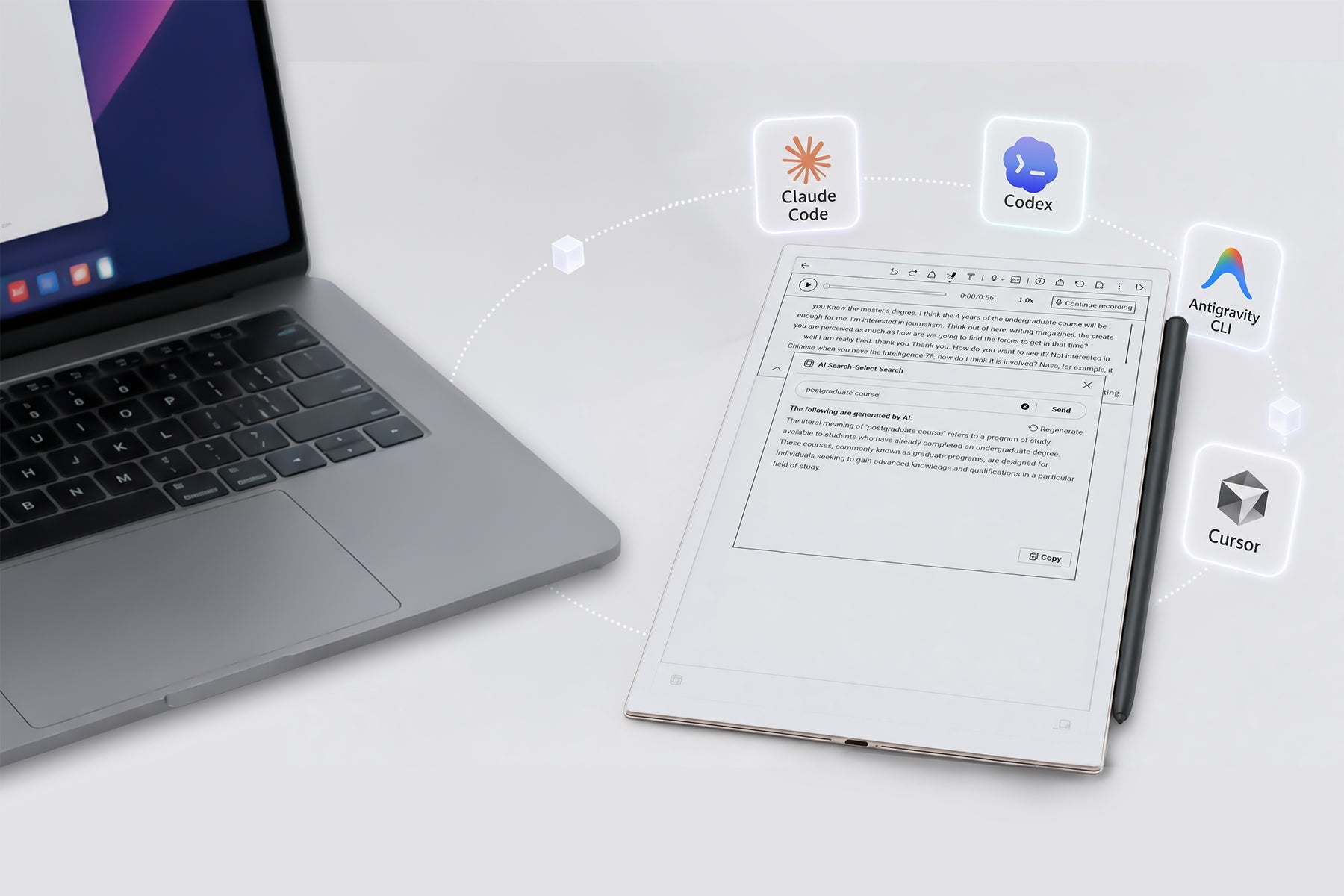
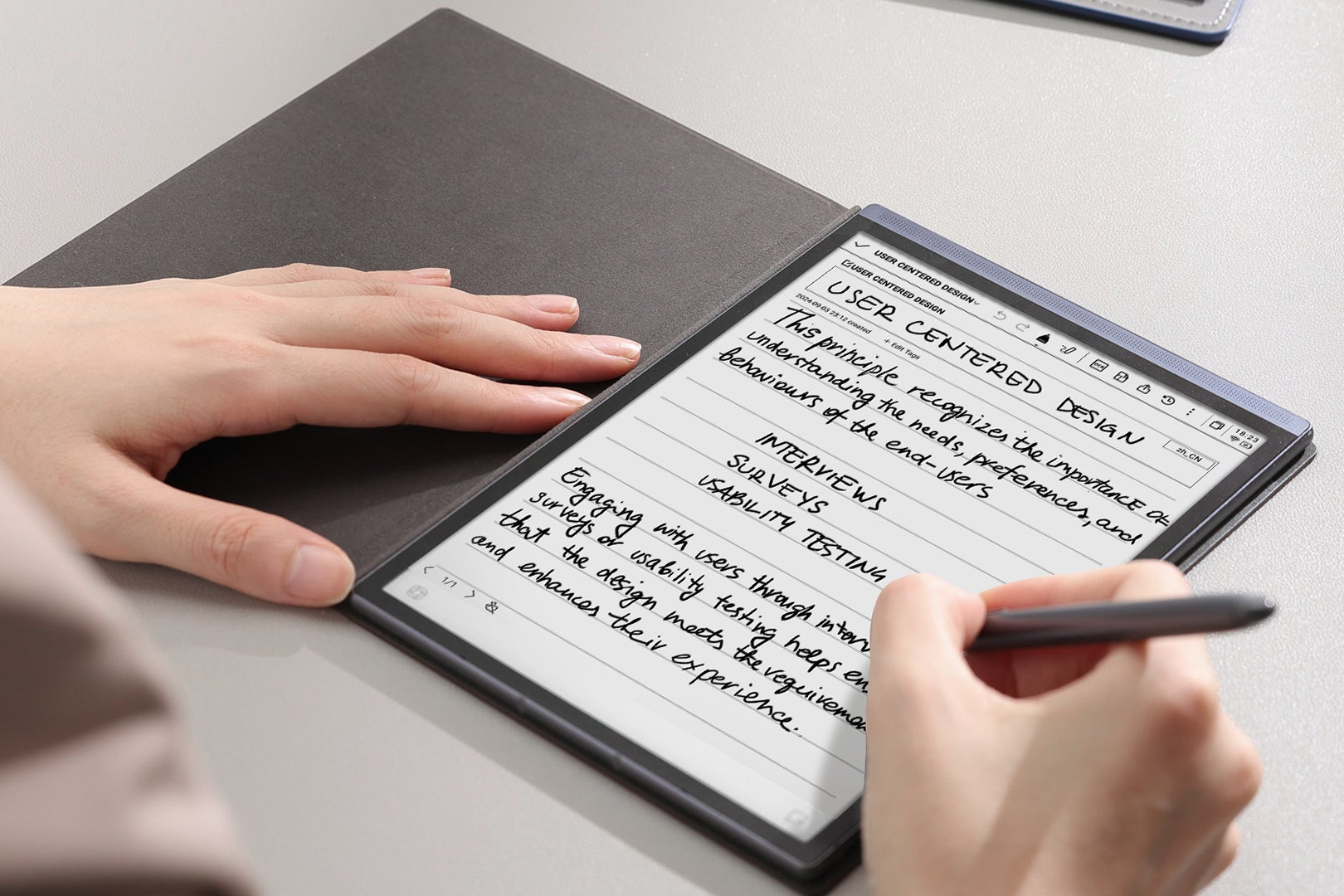
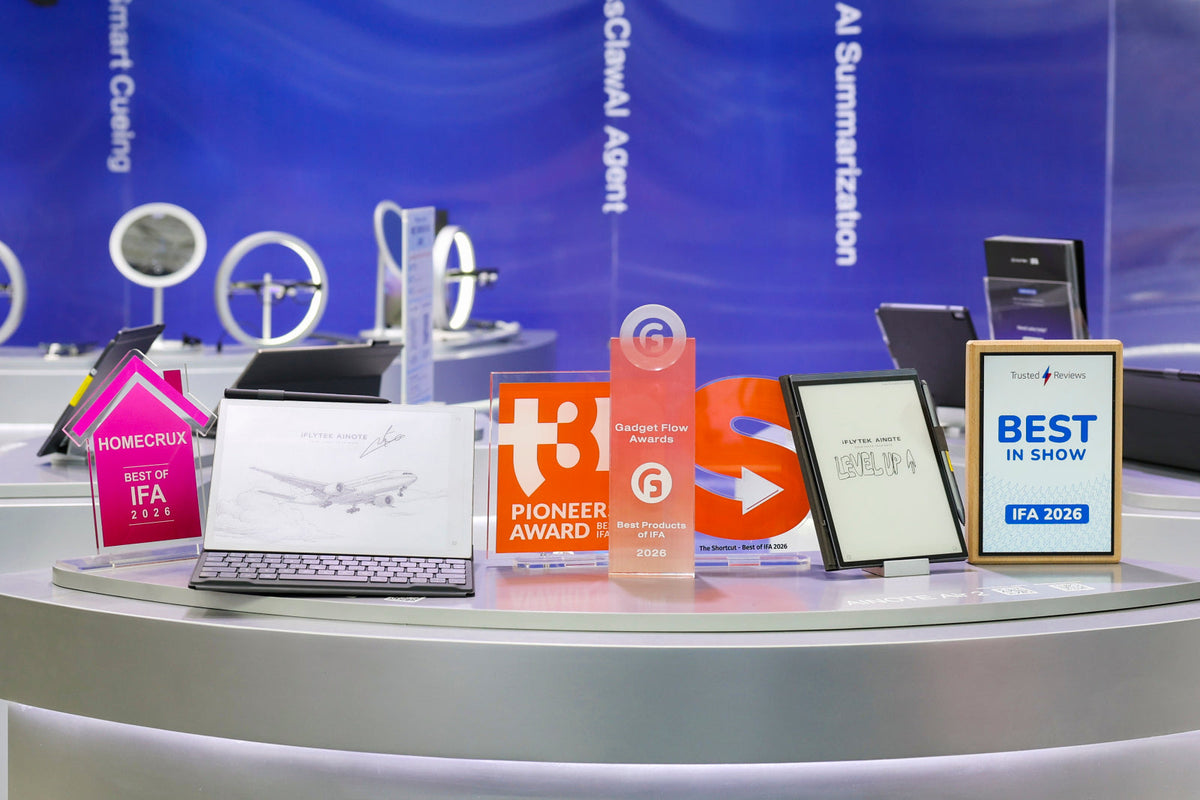
From September 4–8, 2026, AINOTE exhibited for the first time at IFA Berlin, located in Hall 4.2, Stand 115. The event provided an opportunity to present AINOTE 2 and AINOTE Air 2 to European and international audiences. Throughout the show, visitors engaged with the devices in person. Demonstrations focused on three core capabilities: paper-like handwriting on E Ink displays, voice-to-text transcription supporting 18 languages, and AINOTE Skill, which connects notes, calendars, and tasks to AI Agents such as Claude Code and Codex. These features collectively illustrate AINOTE’s positioning as a productivity tool that integrates handwriting, voice, and AI in a single workspace. The exhibition served as a platform to gather direct feedback and observe how professionals, students, and technology enthusiasts interact with the product in a live setting. This input will inform future software and feature development.   AINOTE Receives Four Awards at IFA 2026 During IFA 2026, AINOTE was recognized with four industry awards: t3n Pioneers Award — Best of IFA 2026 Trusted Reviews Best in Show — IFA 2026 The Shortcut Award Gadget Flow Award The t3n Pioneers Award recognizes innovation in consumer technology. t3n, a German technology publication, selected AINOTE for its approach to AI-powered productivity. Trusted Reviews Best in Show is awarded by the UK-based technology outlet Trusted Reviews, highlighting products that distinguish themselves in their category. The Shortcut Award acknowledges products that improve accessibility and intuitive use. AINOTE’s handwriting-first, distraction-free design was cited as a contributing factor. Gadget Flow Award recognizes products that combine design with practical utility. AINOTE’s form factor, E Ink display, and AI features were considered in the selection. These awards reflect external validation of AINOTE’s development direction. They also underscore the product’s focus on integrating handwriting, voice, and AI into a cohesive productivity tool.   Off-Site Workshop: AINOTE at WeWork Berlin Beyond the exhibition hall, AINOTE hosted an off-site workshop during IFA week. The event took place at WeWork Warschauer Platz in Berlin, a location situated near Warschauer Straße station and the East Side Gallery. This site is part of one of Berlin’s largest WeWork communities, with an estimated 6,500 to 8,000 corporate members across the city. The audience included professionals from technology, creative, and international business sectors. The workshop was structured to provide hands-on experience in a realistic office environment rather than a trade show booth. Activities included: 15-minute hands-on sessions where participants tested AINOTE 2 and AINOTE Air 2 within scenarios resembling their daily work routines. Cross-border meeting simulations demonstrating real-time transcription in 18 languages, speaker identification, and automated meeting summaries powered by large language models including GPT-5 and Gemini. Handwriting-to-AI workflow walkthroughs showing how handwritten notes are converted into structured action items and synced with calendars and tasks. In the evening, AINOTE hosted a creator reception and keynote session. Conan Guo, Chief Product Officer at iFLYTEK, shared the company’s vision for the European market: "We're not trying to make AI more complicated or futuristic. We're trying to make it genuinely useful in the things we already do every day." The off-site event generated direct feedback from professionals who regularly manage multilingual meetings, mobile work, and cross-border collaboration. This feedback is being collected and will contribute to product refinement for European users. In addition, attending content creators shared their experiences on social media, extending the reach of the workshop beyond Berlin. Among them was Wajihoo, a creator with a substantial following, who documented the event and AINOTE’s capabilities.   Looking Ahead IFA 2026 marked AINOTE’s first appearance at a major international trade show. The four awards, visitor engagement, and off-site workshop feedback provide a foundation for continued development. Under the philosophy "AI FOR USE, AI FOR TRUST," AINOTE remains committed to data governance and privacy, offering AWS Frankfurt cloud hosting, offline functionality, and compliance with GDPR, ISO 27001/27701, and EN 18031 certifications. Future plans include continued software updates for AINOTE and AI features, expanded retail availability in Europe, and ongoing community engagement through the official Reddit community. For those who could not attend IFA, product information and updates are available on the AINOTE website and blog.

AINOTE Skill Deep Dive – Connect Notes & Schedule Directly to Claude Code & Codex

AINOTE Skill Deep Dive – Connect Notes & Schedule Directly to Claude Code & Codex

With AINOTE Skill, you can generate a secure authorization link to connect your cloud-backed notes, calendar schedules, tasks, and focus star directly into your favorite AI Agents—including Claude Code and Codex—as a dynamic context stream. Your AI Agent can now truly "understand" your knowledge base. Through simple natural language prompts, it can analyze across multiple notes, check for schedule conflicts, and even create new tasks or folders for you.

Aug 18, 2026 AINOTEBRAND 0 comments
AINOTE Air2A Major Update for the AINOTE Air 2, and an Even Bigger Thank You

A Major Update for the AINOTE Air 2, and an Even Bigger Thank You

The AINOTE Air 2 recently received its biggest software overhaul yet—the NoteOS update, bringing a redesigned interface, upgraded Fusion Notes,  enhanced handwriting tools, and improved AI transcription capabilities. For a complete walkthrough of everything new in this release, check out our detailed announcement: AINOTE Air 2 Major System Update – NoteOS. But the real news today is about something else: a special thank-you to our earliest users. 5 Years of Pro – Free for Early AINOTE Air 2 Users To show our appreciation for the users who believed in the AINOTE Air 2 from the beginning, we're offering an exclusive reward: All AINOTE Air 2 users who activated their devices on or before October 31, 2026, are eligible to receive 5 years of AINOTE Pro Plan – at no cost. This is our way of saying thank you for your trust and support. We call it the "Loyal User Exclusive Benefit" – because that's exactly what it is. What Does AINOTE Pro Unlock? Pro Plan takes your AINOTE Air 2 to the next level. Here's what you get: More AI Models to Choose From – In addition to GPT-5.2, Pro gives you access to GPT-5.5,Gemini 3.5 Flash and future models Unlimited Note Sync – Back up all your work and access it across devices – no storage limits, no time restrictions Pro is built for users who want to take productivity further – and now, early AINOTE Air 2 users can enjoy it for 5 full years, completely free. Note: The 5-year gift Pro Plan does not include AINOTE Care+'s replacement service. Reward Period Validity – 5 years from the successful claim date (5 × 365 days) Claim Deadline – December 31, 2026, 23:59:59*To claim the benefit, activate your existing or new device by October 31, and follow the on-screen instructions before December 31. If not claimed, the benefit will automatically expire on December 31. Important Things to Know 1. Your Benefit is Tied to Your Account, Not a Single DeviceOnce claimed, the 5-year Pro Plan is permanently linked to your AINOTE account – not to a specific device. Log in to any AINOTE device and enjoy your Pro benefits wherever you go. The Pro Plan cannot be sold, transferred, or redeemed for cash. 2. One Benefit per Eligible DeviceTo ensure fairness, each eligible AINOTE Air 2 device can generate only one 5-year Pro Plan. The system will accurately identify each device – duplicate requests will not be processed. 3. One Benefit per AccountEach AINOTE account can claim this reward only once. If you own multiple eligible AINOTE Air 2 devices, simply choose one of them to claim your gift. Your other devices will not generate additional rewards for the same account. 4. Your Free Pro Plan Will Be Added to Your Existing PlanIf your account already has an active Pro Plan, the 5-year gift will be automatically extended – giving you even more time to enjoy the benefits without interruption. For example: Current Pro Plan valid until June 30, 2027 After claiming the 5-year gift, the new expiration date extends to June 28, 2032(after 365 × 5 days) 5. The 5-Year Gift is a Non-Annual Pro Plan – Care+ Replacement Not IncludedThis complimentary 5-year Pro Plan is a non-annual Pro plan. It does not include the one-time replacement-for-repair service under AINOTE Care+. For full details on what is and isn't included, please refer to our AINOTE Pro subscription page. A Quick Reminder: If you currently have auto-renewal enabled, please review your subscription settings after claiming to avoid any charges during your free Pro Plan period. How to Claim Your 5-Year Pro Gift Ensure your AINOTE Air 2 was activated on or before October 31, 2026 Open your AINOTE device and navigate to the rewards or Pro Plan section Follow the on-screen instructions to claim your 5-year Pro Plan Confirm the claim and enjoy your extended Pro benefits If you encounter any issues, please reach out to our customer support team for assistance. Why This Matters The NoteOS update made the AINOTE Air 2 more powerful than ever. And now, with 5 years of Pro Plan included for early users, your device is ready to handle your workflow from transcription to premium cloud sync – all without recurring fees. If you're an eligible AINOTE Air 2 user, don't wait. Claim your 5-year Pro Plan before the December 31 deadline and unlock the full potential of your device. New to AINOTE Air 2? This Is Your Moment. If you're not yet an AINOTE Air 2 owner, this is the time to act. Any device purchased and activated on or before October 31, 2026, qualifies for the same 5-year Pro Plan gift. Whether you're upgrading from another note-taking device or taking your first step into the world of AI-powered E Ink AI notebook, this offer makes the AINOTE Air 2 an even more compelling choice. Don't miss out – grab yours before October 31 and lock in 5 years of Pro, free. Have you received the NoteOS update on your AINOTE Air 2? Join the official Reddit community to share your experience with other users.

Aug 4, 2026 AINOTEBRAND 0 comments
AINOTE Air2AINOTE Air 2 Major System Update: NoteOS Officially Rolls Out

AINOTE Air 2 Major System Update: NoteOS Officially Rolls Out

The wait is finally over for AINOTE Air 2 users. AINOTE has officially begun rolling out a significant system update that brings the brand-new NoteOS experience to the device. This is not a routine patch or a minor feature tweak. According to the official announcement, this is a major system upgrade that fundamentally changes the user interface and how key features operate on the Air 2. The update is being pushed in small, staged batches to ensure system stability, so if you haven't received the notification on your device yet, don't worry—more users will be added over the coming days. Here's a comprehensive breakdown of what the NoteOS update brings to your AINOTE Air 2.   What's New in the NoteOS Update 1. A Completely Redesigned System Interface The most visible change is the overhauled user interface. The update touches virtually every corner of the system: Home, Notes, Reading, Calendar, App Center, Settings, and Control Center have all been redesigned from the ground up Navigation has been restructured - major entry points are now organized differently, so some features may be located in new places Visual elements including text, icons, cards, and information hierarchy have been optimized specifically for the Air 2's E Ink display Multi-language layouts have been improved, with better font rendering, text wrapping, and button sizing across all supported system languages The goal is a more intuitive, visually cohesive experience that takes full advantage of the E Ink screen's capabilities. 2. Upgraded Fusion Notes & Handwriting For users who rely on the Air 2 for note-taking, this update delivers substantial improvements to the core writing experience: Unified Workspace The new Fusion Notes workspace brings together handwriting, audio, transcription, translation, and AI content into one seamless environment. Whether you're recording a meeting, writing notes by hand, or reviewing transcribed text, everything lives in a single, unified space. Enhanced Canvas Operations Reduced side-toolbar obstruction for a cleaner writing area Improved zooming, two-finger dragging, page turning, and scrolling Enhanced title editing and recording dialogs Handwriting Editing For the first time, users can now cut, copy, and paste handwriting across different pages and Fusion Notes. This brings handwriting editing much closer to the flexibility of text editing. Smart Pen Optimizations The update improves smart-pen selection, erase detection, and toolbar positioning, with better support for both left-handed and right-handed modes.   3. Recording, Transcription & Translation Upgrades The Air 2's AI-powered recording and transcription capabilities—one of its standout features—receive significant attention in this update: Improved Recording States Better visual feedback for recording start, in-progress, completion, and playback states. Flexible Transcript & Translation Views Users can now choose to view original text, translated text, or a side-by-side comparison - making it easier than ever to follow multi-language meetings and conversations. Seamless Audio Switching Play recordings through the built-in speaker, Type-C headphones, or Bluetooth headphones with smoother continuity. Enhanced Navigation Translation language selection, translation modes, and long-text navigation have all been reorganized for easier access.   What This Means for AINOTE Air 2 Users This update represents a significant step forward for the AINOTE Air 2. The NoteOS experience isn't just a cosmetic refresh—it's a fundamental rethinking of how the device handles note-taking, recording, and AI-powered productivity. For professionals who rely on the Air 2 for meeting transcription and daily note-taking, the improved Fusion Notes workspace and unified workflow will save time and reduce friction. For students and researchers, the enhanced handwriting tools and flexible translation views open up new possibilities for managing complex information. The hardware remains the same—an 8.2-inch E Ink display with a quad-core processor, 4GB RAM, and 32GB storage—but the software now delivers a much more polished and capable experience. How to Get the Update The NoteOS update is being rolled out in staged batches to ensure system stability: Check your device periodically for the update notification Connect to Wi-Fi before downloading—the update requires a stable internet connection Read the release notes carefully before installing—this is a major update that changes how some features work Back up your important notes before proceeding If you haven't received the update yet, rest assured that AINOTE is expanding the push to more users over the next few days.   Frequently Asked Questions 1. Does AINOTE Air 2 require an internet connection for AI features? Yes. AI features, including AI Meeting Minutes, Note Q&A, and online transcription, require an active internet connection. AI features also require account sign-in. 2. Can AINOTE Air 2 transcribe recordings offline? No. AINOTE Air 2 uses online cloud services for audio transcription, so an internet connection is required. 3. Will my notes remain available if I turn off cloud sync? Yes. Turning off cloud sync does not prevent you from accessing or using your locally stored notes. 4. What is Fusion Notes? Fusion Notes brings handwriting, audio recordings, transcription, translation, and AI-generated content together in one workspace, making it easier to manage and review your notes. 5. Can I convert scanned documents into editable notes? Yes. AINOTE Air 2 supports OCR, allowing you to recognize text in scanned documents and convert it into editable notes or PDFs. 6. Can I export my notes and AI-generated content? Yes. You can select different content, including original text, meeting minutes, AI results, and OCR-cleaned content, and generate PDF or TXT files. 7. Which languages does AINOTE Air 2 support? AINOTE Air 2 supports 14 system languages, including English, French, German, Spanish, Japanese, Korean, and more. 8. Can I use Bluetooth headphones to listen to recordings? Yes. You can play recordings through the built-in speaker, Type-C headphones, or Bluetooth headphones. 9. Is the Note OS update available for all AINOTE devices? The major Note OS Beta update described in this announcement was specifically rolled out for AINOTE Air 2. Update availability for other models should be checked separately. 10. What should I do if I encounter a problem after a system update? You can contact AINOTE Customer Support through the official support channels and provide details about the issue, including the affected feature and the steps that caused it.   Share Your Feedback AINOTE is actively seeking user feedback on this major update. You can share your thoughts and report any issues through the r/AINOTE community on Reddit User testing and real-world feedback are crucial to making this update rock-solid, so your input matters.   Final Thoughts The NoteOS update marks a new chapter for the AINOTE Air 2. With a redesigned interface, unified Fusion Notes workspace, enhanced handwriting tools, and improved transcription capabilities, the device is now more capable than ever as an AI-powered productivity tool. If you're an AINOTE Air 2 user, this is an update worth installing. Just make sure to read the release notes, back up your data, and give yourself some time to get familiar with the new interface and navigation. Have you received the NoteOS update on your AINOTE Air 2? Join the official Reddit community to share your experience with other users. https://www.reddit.com/r/iFLYTEKAINOTE/

Jul 30, 2026 AINOTEBRAND 0 comments
AINOTE 2AINOTE 2 Software Update: Smarter AI, Deeper Insights from Every Recording

AINOTE 2 Software Update: Smarter AI, Deeper Insights from Every Recording

Version number: XFDXB311EH_R_2.3.0 Published:2026-06-22This release focuses on five areas where users told us the previous version fell short: how AI integrates with notes, how the device handles multi-language work, how it serves long-form reading, how notes leave the device for downstream tools, and how the day-to-day experience holds up at scale. We have not introduced new categories of features. We have made the categories you already use work the way you expected them to work. 1. Notes & AI — Closer to Your Content 1.1 AIAide is now closer to your notes The AIAide entry point has been updated: a refreshed AI icon makes the assistant easier to identify. More importantly, AIAide now uses the recording transcript of your current note as a knowledge base you can ask questions about. Open AIAide from within a note that contains a recording and ask: "Summarize the key decisions from this meeting." / "Where in this lecture did the speaker discuss X?" The meeting minutes entry has been reorganized as a dedicated tab placed at the top of the note page — distinct from the handwritten note content and easy to reach without navigating into the menu. What this means for you: AI is no longer a separate tool you switch to. It works on the content you already have in front of you — making your notes searchable, summarizable, and re-usable as a knowledge base. 1.2 Automatic meeting minutes When a recording stops, AINOTE 2 now automatically generates structured meeting minutes from the recording transcript — topics, decisions, action items, and follow-ups. Within the same minutes tab, you can switch between the original recording, its transcript, and the AI-generated minutes. What this means for you: The work that used to happen after the meeting — listening back, identifying decisions, drafting follow-ups — happens automatically. You leave the room with the meeting record already drafted. 1.3 Note interface refinements The menu bar has been moved to the side and now supports left-right switching, freeing vertical space for content. Within a note, you can create titles directly from the top region using handwriting, and a shortcut for title creation is available throughout the note flow. 1.4 Writing and recognition English and Japanese offline OCR accuracy improved. 2. Broader Language Coverage 2.1 Online transcription and translation Online transcription now supports Dutch and Portuguese, bringing the total to 18 languages. Translation now supports Dutch, Portuguese, and Thai, bringing the total to 14 language pairs. 2.2 Translation in side-by-side comparison view When recording with real-time translation enabled, the spoken-language transcript and its translated output now display side by side in the same view, visible in parallel as the recording unfolds. 2.3 New system languages AINOTE 2 now ships eight additional system (UI) languages: Thai, Malay. 3. Reading Capabilities Tappable links inside PDFs — citations, internal cross-references, and URLs in PDF documents can now be opened directly. Text selection in image-based (scanned) PDFs — scanned case files, archived contracts, and image-only documents now support text selection, copy, lookup, and translation. Two-page landscape PDF reading — for academic journals, large-format documents, and content where context across facing pages matters. Landscape annotation for non-PDF documents — EPUB, MOBI, AWZ3, not only PDFs. 4. Note Export and Sharing 4.1 Word export Notes can now be exported as Word (.docx) documents, in addition to PDF. The TXT export option has been removed. 4.2 Third-party cloud sharing Notes can be shared directly to third-party cloud services — OneDrive, Google Drive, and Dropbox. 5. Core Experience Optimizations 5.1 Calendar sync refinements Recurring event details from both Google and Outlook calendars are now displayed correctly. Hidden folders in Google Calendar are now recognized — folders the user has hidden in Google will no longer appear in AINOTE 2 sync. Outlook event details are now displayed in full. 5.2 Direct access to customer support The Help screen now includes a WhatsApp Business QR code and an after-sales request QR code. 5.3 In-product user guide A user guide has been added, with entry points on the home page and in Settings. 5.4 Meeting minutes model options For Pro members, meeting minutes can be generated using GPT-5.5 or Gemini 3.5 Flash as alternative models.

Jun 22, 2026 AINOTEBRAND 0 comments